7
OPERATION
GB
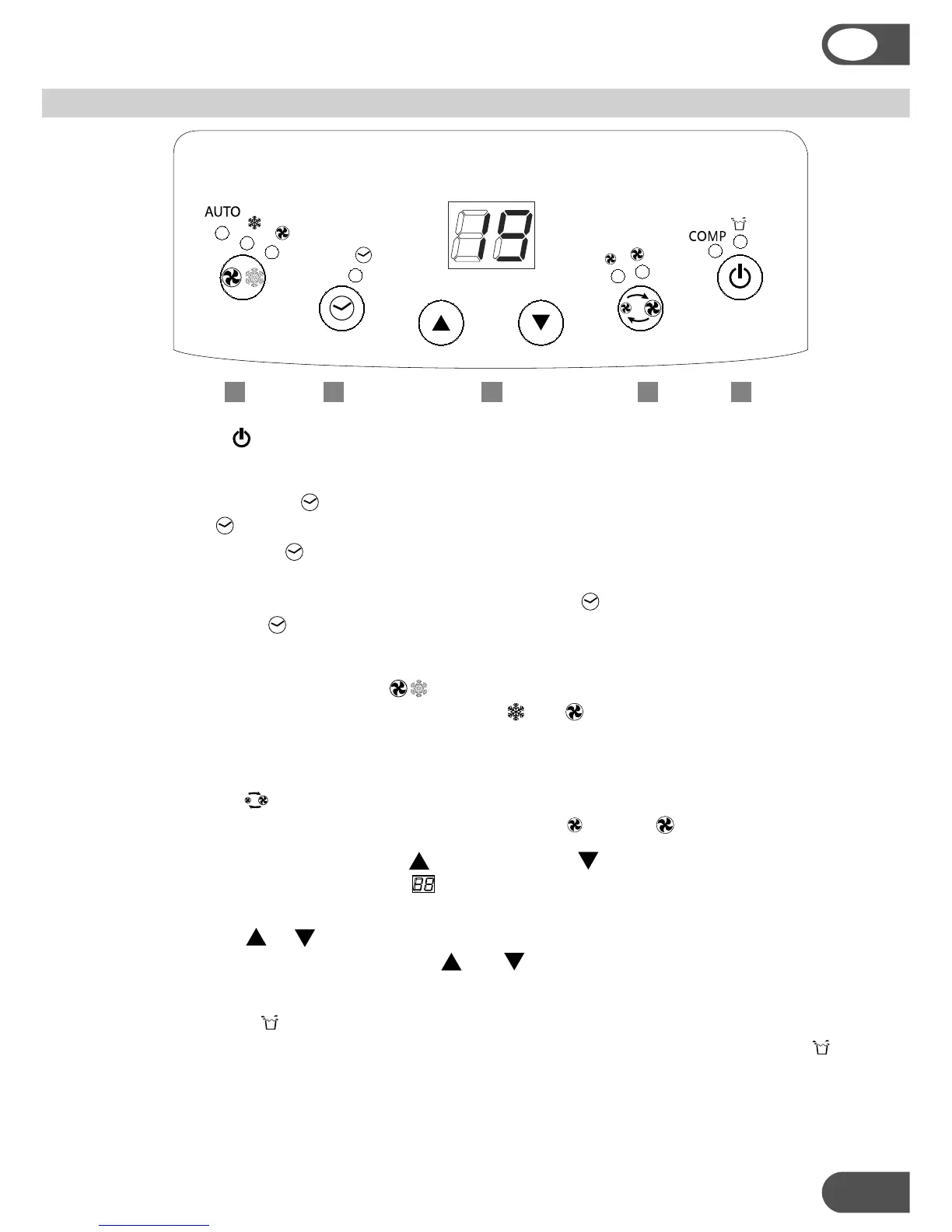
1. ON/OFF
Press the ON/OFF-button to switch the unit on or off.
2. Setting the timer
Press the -button to set the operating hours (1 to 12 hours, 1 hour each press).
When set, the LED will light up.
When the set hours have elapsed, the unit will turn off automatically. The display
will show the hour(s) remaining when you press the -button.
By pressing the -button but without turning the unit on, you can pre-set in how
many hour(s) the unit will switch on automatically.
3. Setting the operating mode
Select the required operating mode: cooling , fan or AUTO. The corresponding
LED will lit. In AUTO mode the unit will select cooling or fan depending on the ambient
temperature.
4. Fan speed
Select the fan speed, the corresponding LED will lit: - low or - high.
5. Temperature setting, increase (up) or decrease (down)
When the unit is ON the display shows the ambient temperature, and any LED of
operating mode, fan speed, timer is on.
Press button or to see the set temperature and adjust if necessary – in the
range from 17 °C to 32 °C – with the and buttons (1 °C each press). After a few
seconds the room temperature will be displayed.
Warning lights and COMP
When the water container is full, the unit automatically stops, the warning light
will flash to signal that the container must be emptied.
When the unit is cooling, the compressor light COMP will be on. If this light is off
5 32 14



 To Next Page