9
1.
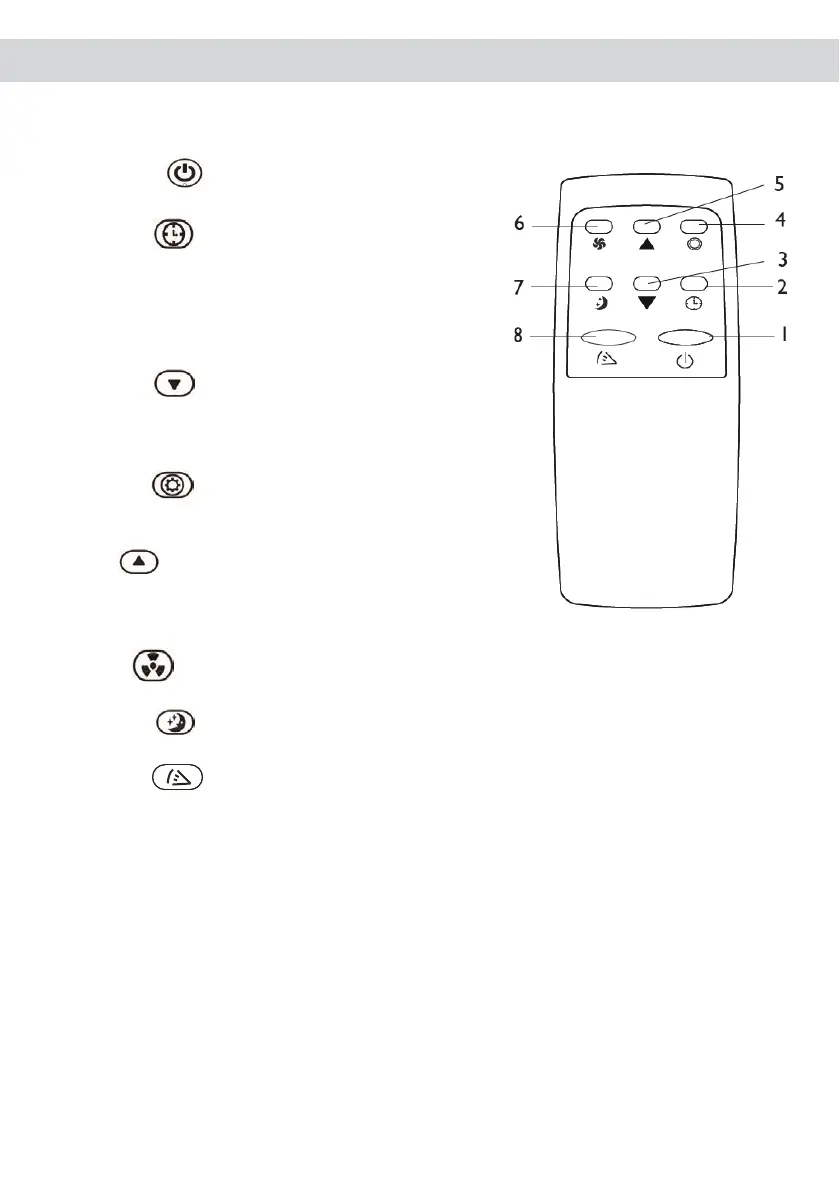
POWER : Press to turn the unit on/off.
2.
TIMER :Press to set the timer. Once
set, selected duration will flash 5 times as
confirmation. Under power-on or standby
mode, press this button to setup the on/off
timer between 1~24.
3.
DOWN : Press to decrease the desired
temperature, or the timer duration after
pressing the timer button.
4.
MODE : Press to choose between
cooling, dry or fan modes.
5.
UP : Press to increase the desired
temperature, or the timer duration after
pressing the timer button.
6.
FAN : Press to change between low /high fan speeds.
7.
SLEEP : (Only in cooling mode) :Press to enable sleep mode.
8.
SWING : Press to turn the swing function on and off
Two AAA-batteries are required to use the remote control.
IMPORTANT:
There is a 3 minutes delay on power on. In order to protect the life of the
compressor and electronic components please do not switch on the unit for at least
5 minutes after you turned the unit off.



 To Next Page