52
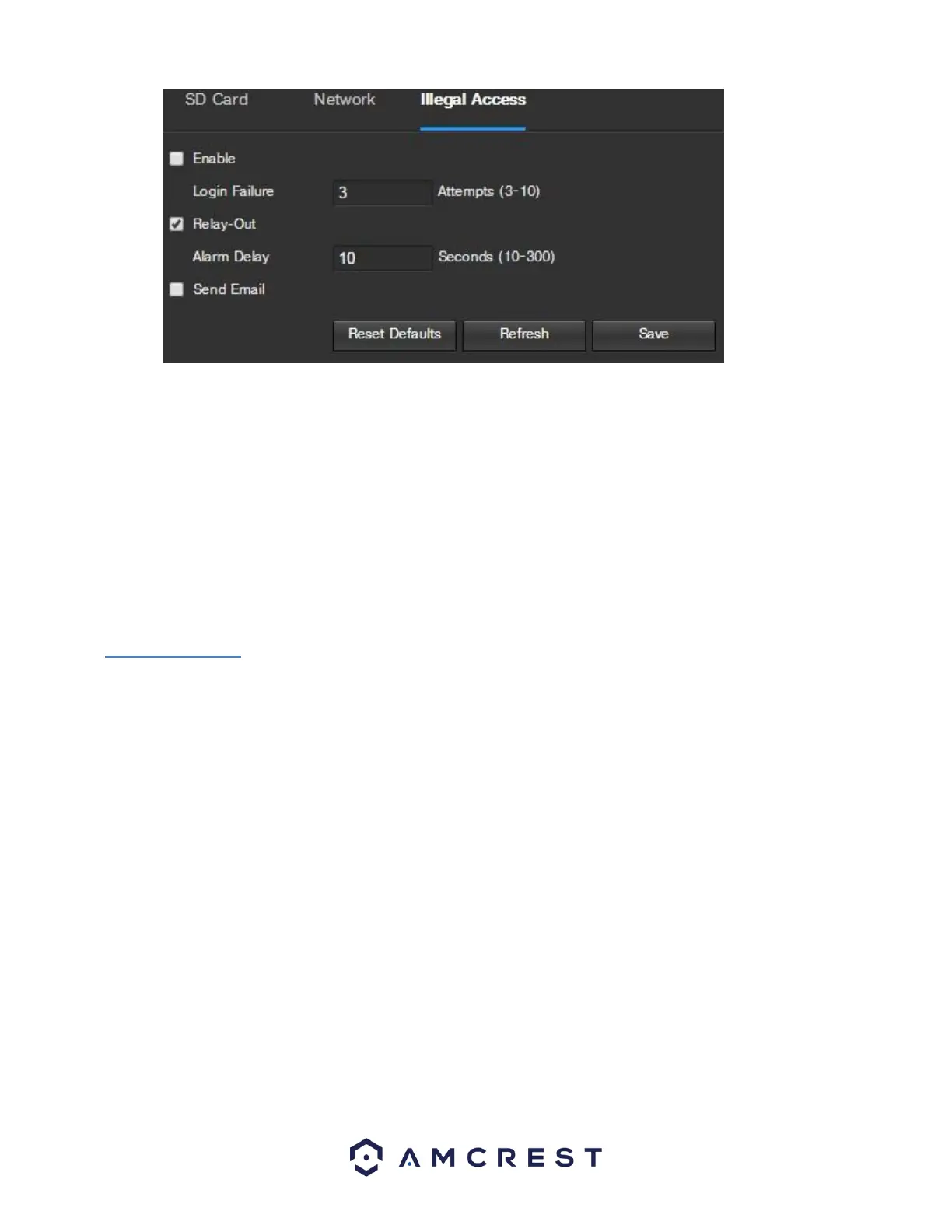
Below is an explanation of the fields on the Illegal Access settings tab:
• Enable: This checkbox enables the Illegal Access abnormality trigger for the camera.
• Login Failure: This field allows the user to specify how many failed login attempts must be attempted to trigger an
Illegal Access abnormality event.
• Relay Out: This checkbox allows the user to enable the camera to trigger an alarm when illegal access is detected.
• Alarm Delay: This field specifies in seconds how long the delay between alarm activation and relay alarm activation
should be.
• Send Email: This checkbox allows the user to enable the camera to send an email when illegal access is attempted.
To reset to default settings, click the Reset Defaults button. To refresh the page, click the Refresh button. To save the settings,
click the Save button.
5.4.4 Storage
This menu section allows the user to change storage settings for the camera.
5.4.4.1 Schedule
The schedule menu manages the recording schedule for the camera. This menu has 3 tabs: Record Schedule, Snapshot Schedule,
and Holiday Schedule.
5.4.4.1.1 Record Schedule
This tab is where video recording settings are configured. Below is a screenshot of the Record Schedule
settings screen:















 To Next Page