9
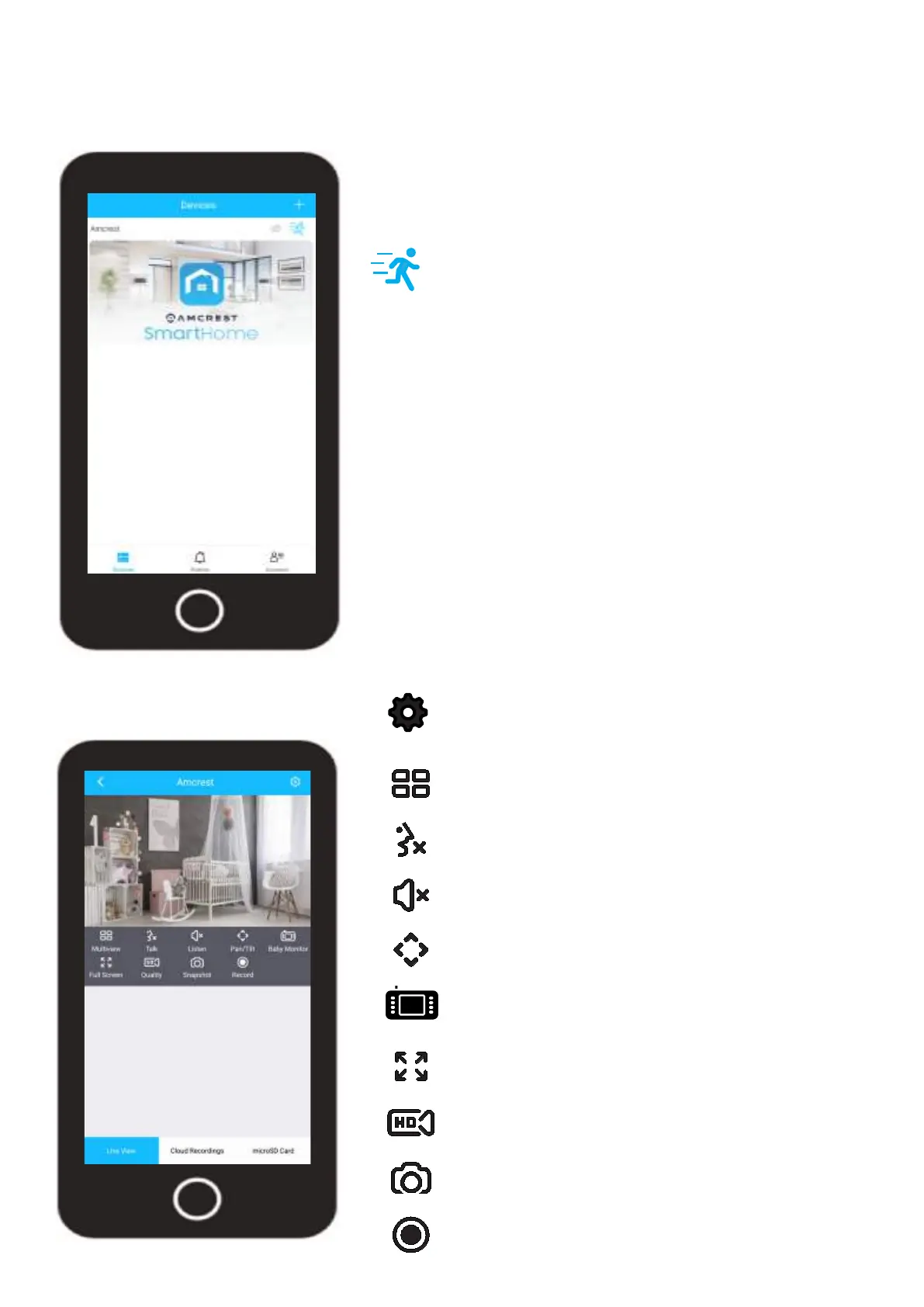
Live View
SETTINGS
Provides access to settings such as motion detection, video,
firmware updates, etc.
MULTIVIEW
View multiple devices on one screen.
TALK
This device does not have 2 way audio capabilities.
LISTEN
Enables the speaker for two way communication.
FULL SCREEN
View your feed in full screen mode.
SD/HD
Set the device to standard or high definition resolution.
SNAPSHOT
Manually take a photo.
RECORD
Manually record a video.
BABY MONITOR
Enables baby monitor mode.
PAN/TILT
Enables pan/tilt options.
Devices Menu
The devices menu displays all connected devices on your Amcrest Smart Home account as well
as direct access event notifications, and account settings.
Motion Detection: Tap on the “running man” icon to
enable or disable motion detection. This will also
enable or disable push notifications for your camera.
Privacy Mode: Tap on the “eyeball” icon to set your
camera into privacy mode. Privacy mode will auto-
matically hide the lens of your camera to block out
any unwanted viewing of your camera.













 To Next Page