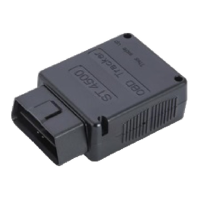
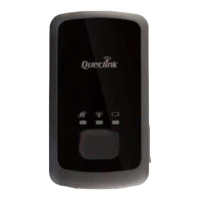
2. How does this technology work?
Your device reads data from satellites to nd its location; it then uses mobile networks to transmit its
location to our servers. Your device needs both: mobile network and GPS signals to work.
3. Do I need to purchase or provide a SIM card?
No, we ship the device with the SIM card it needs to transmit data. That SIM card only works with this
device.
4. Do I need to install the SIM card?
No, the card is already installed. Please do not remove it.
5. I can´t see my device’s location on the website.
If your device is powered ON, there are 2 reasons for this problem:
• Poor mobile network signal: Your device may be in a zone with poor mobile data coverage.
It will start transmitting again as soon as it gets into a better coverage zone. The device has an internal
memory to store locations in those cases. That information will be transmitted as soon as the device can
connect to the network again.
• Poor GPS signal: Your device may have lost GPS signal. That may happen when your GPS tracker is
covered by a thick surface or if your device is inside a building, underground or near tall buildings.
Frequently asked questions:
Dear Customer. This section contains very important information. Please do not skip it.
Show location: Your device updates its location at predened intervals. The default interval is one
minute while moving. You can change the conguration of the device while in motion using
the “Settings tool” (wrench). Please contact us in order to change the location update interval while
the device is stationary.
Device settings: Click this icon to access and congure your device’s settings. You can change the
location update interval while the device is in motion and congure email or text messages
notications following these directions:
7. Does weather aect my device?
Atmospheric conditions, such as rain or snow, can weaken signals. Extreme temperatures can also aect
battery operated devices and cause signal degradation which may result in lower accuracy or communication
failures. Please do not put the device on a very hot or humid place, avoid exposure to direct sunlight. Too high
temperatures will damage the device or even cause battery explosion.
A. HOW TO LOCATE YOUR DEVICE
Follow these instructions to locate your device:
1. Click on menu 1. Devices; your list of devices will appear and you will see a group of buttons next to your
device.
Basic Location Instructions:
B. HOW TO WATCH HISTORY (User interface may change if you are using the website on a desktop or in a
mobile phone)
1. Click on “History” tab. Select from the list of pre-determined date and time ranges or select
Advanced Search to perform a historical search.
2. Click Search to view the results of the device you selected. Then Click Watch to view a map and
table of all the actions and paths taken by a given device for the date range selected.
3. Click on each icon in the path or table to display the corresponding details.
6. My device reports a location that is slightly o from the actual location.
Accuracy depends on many factors beyond our control. For example: weather, clouds, tall buildings
or trees, bodies of water and device location.
8. How do I process the payment of my tracking service?
Ten days before the service expires it will pop up a button which says: “Expires soon. Click to renew”. Please
click on there, choose the tracking plan that you want to pay for and ll in the credit card/ Paypal account
information. Please remember we don’t do automatic debits.
1. Click on “Notications”
2. Click on “New notication”
3. Choose the type of notication (If ignition cable is installed, most recommended
is "IgnitonOn").
4. Enter your email address or your cellphone number as follows:
1+cell phone number@textmagic.com
Thank you for choosing
For further information please contact us at support@americaloc.com, 8558303390 or watch our
video tutorials at our YouTube channel:
https://www.youtube.com/channel/UC3i6ZrVLBqEvikB7XEobi5g
To download our app please search by “Americaloc Viewer” in the Google Play Store and in the
App Store.
1. How long does it take to activate my device after processing a payment?
Your device will be active after the payment once you turn it o and turn it back on.
9. How do I know when my service expires?
Click on “Account options”
Click on “Get info” next to “My services”.


 To Previous Page
 Loading...