
 Need help?
Do you have a question about the American DJ Mega Par Profile and is the answer not in the manual?
Instructions for checking the shipping carton for damage and verifying all accessories are present.
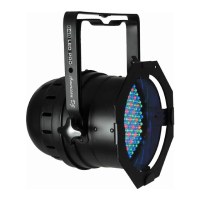
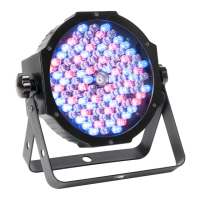
Overview of the Mega Par Profile as an intelligent, high-powered LED par fixture with DMX control.
Contact information and service hours for setup help and technical questions.
Key warnings about electrical shock, fire risk, and avoiding exposure to rain or moisture.
Guidance on reading instructions and list of key product features including colors, modes, and DMX compatibility.
Details on the 3-year limited warranty, including how to validate the purchase and obtain an RA number.
Covers electrical safety, proper operation, mounting, ventilation, and conditions requiring professional service.
Explanation of the automatic voltage switch for universal power compatibility and DMX protocol.
Instructions on linking fixtures in a DMX line and the importance of DMX addressing.
Details on standard 3-pin XLR connectors and shielded cable requirements for DMX data transmission.
Diagram and explanation of XLR pin assignments (Ground, Data +, Data -) for DMX.
Explanation of using a terminator (110-120 ohm resistor) to prevent signal errors.
Chart detailing cable conversion for using 5-pin DMX cables with 3-pin DMX lines.
Instructions to turn the LED display on/off, set auto-off, and flip the display 180°.
Introduction to the five main operating modes: Sound-Active, Static Color, Auto, RGB, and DMX.
How to activate Sound Active mode and adjust sound sensitivity (SJ-X settings).
How to select colors and activate strobe/flash effects (FS.XX settings) in Static Color mode.
How to choose between Color Fade, Color Change, or combined modes and adjust speed (SP.XX).
How to adjust Red (r.XXX), Green (g.XXX), and Blue (b.XXX) intensities and apply strobe effects.
How to select DMX modes (Ch.01-Ch.07) and set the DMX address for fixture control.
Procedure to reset all modes and settings to their default factory configurations.
Instructions for activating the ADJ LED RC remote control function (IrXX settings).
How to link units in Master-Slave mode using XLR cables and define master/slave roles.
Detailed list of functions controllable via the ADJ LED RC remote, like Blackout, Auto Run, and Program Selection.
How to use the remote's 'S' button to set the DMX address and 'DMX Mode' button for channel selection.
Steps to select DMX channel mode and set the DMX address using the fixture's buttons.
How the LED colors (Red, Green, Blue) indicate the selected DMX mode (1-7 channels).
Details DMX values for Channel 1, controlling Color Macros, and its associated functions.
Details DMX values for Channel 1 (Color Macros) and Channel 2 (Dimmer).
Details DMX values for Channels 1 (Red), 2 (Green), and 3 (Blue) color control.
Details DMX values for Channels 1-3 (RGB) and Channel 4 (Master Dimmer).
Details DMX values for Channels 1-3 (RGB), Channel 4 (Master Dimmer), and Channel 5 (Color Macros).
Details DMX values for Channels 1-3 (RGB), Channel 4 (Color Macros), and Channels 5-6 (Strobing).
Details DMX values for Channels 1-3 (RGB), Channel 4 (Color Macros), Channels 5-6 (Strobing/Programs), and Channel 7 (Master Dimmer).
Instructions for connecting multiple fixtures using IEC input/output sockets, with a maximum limit of 33.
Steps to disconnect power, access the fuse holder, and replace the fuse with a new one.
Solutions for DMX communication failures and unit not responding to sound active mode.
Instructions for cleaning the unit's casing and optics, with recommendations on cleaning frequency.
Details on warranty terms, conditions, exclusions, and specific durations for product categories.
Comprehensive list of technical specifications including voltage, LEDs, beam angle, power, and dimensions.
Explanation of the fixture's automatic voltage sensing capability for universal power use.
Contact details for American DJ World Headquarters and American DJ Europe.
 Power
Power| voltage | 100V ~ 240V |
|---|---|
| power draw | 18W |
| fuse | 0.5 Amp |
 Lighting Specifications
| LED count | 108 x 10mm LED’s |
|---|---|
| beam angle | 30 Degrees |
| colors | RGB Color Mixing |
 Weight and Dimensions
| weight | 1.1 kg |
|---|---|
| length | 225 mm |
| width | 220 mm |
| height | 85 mm |


 To Next Page