SpeedDome Series Programmable Commands D-1
Appendix D: SpeedDome Series Programmable Commands
When used in combination with numeric keypad inputs, the F1 keys on the AD2078A and AD Touch
Tracker keyboards accomplish specific functions related to the operation of SpeedDome, SpeedDome
LT, and SpeedDome Ultra domes. Following is a list of F1 key combinations and their associated
functions.
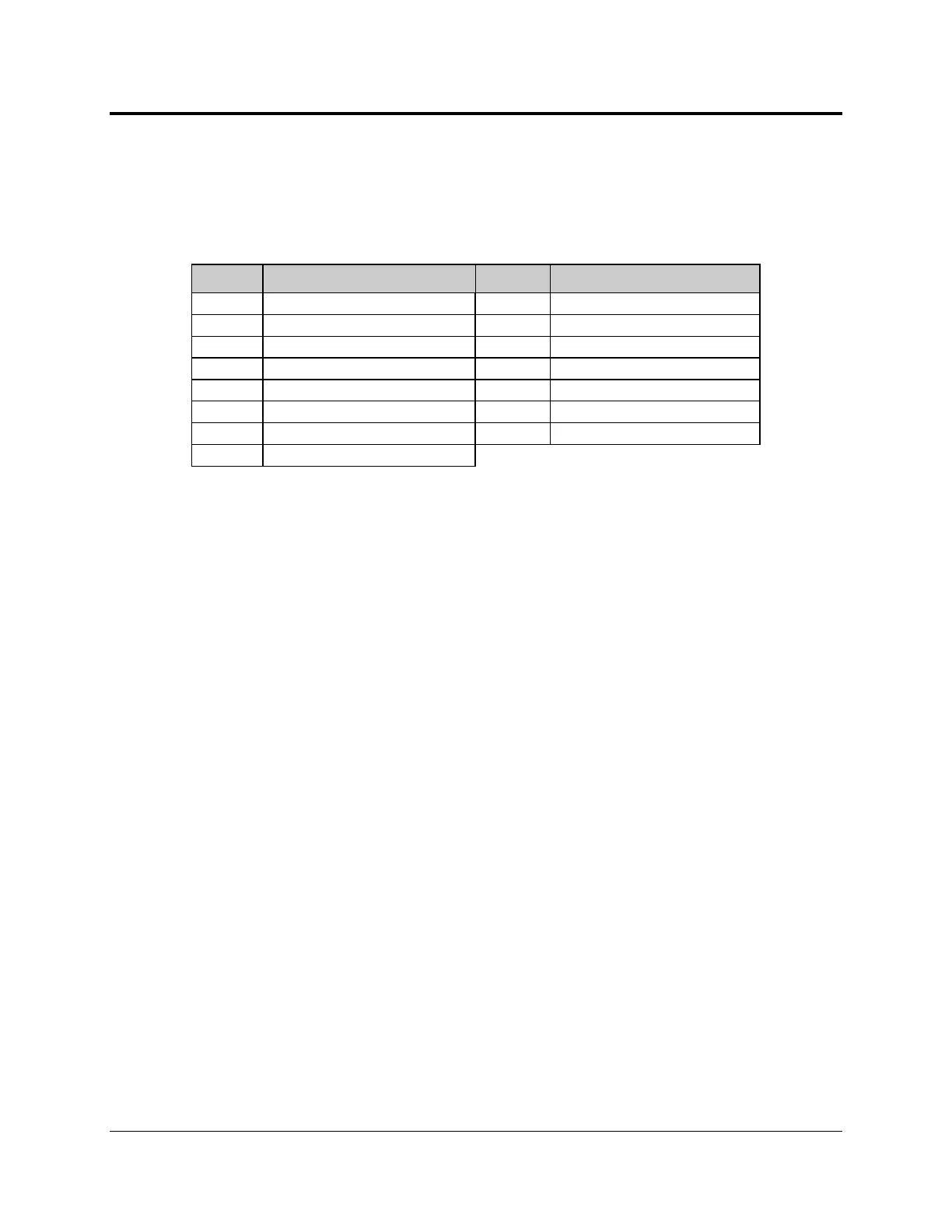
Keys Function Keys Function
19-F1 Flip Camera Position 180º 33-F1 Go to Pattern # 3
20-F1 Reset Iris 41-F1 Auto Repeat Pattern # 1
21-F1 Run Pattern # 1 42-F1 Auto Repeat Pattern # 2
22-F1 Run Pattern # 2 43-F1 Auto Repeat Pattern # 3
23-F1 Run Pattern # 3 69-F1 Return to Auto Iris / Auto Focus
30-F1 Reset Dome 70-F1 Set Auxiliary 4 OFF
31-F1 Go to Pattern # 1 71-F1 Set Auxiliary 4 ON
32-F1 Go to Pattern # 2




 To Next Page