Installation and Operation
2
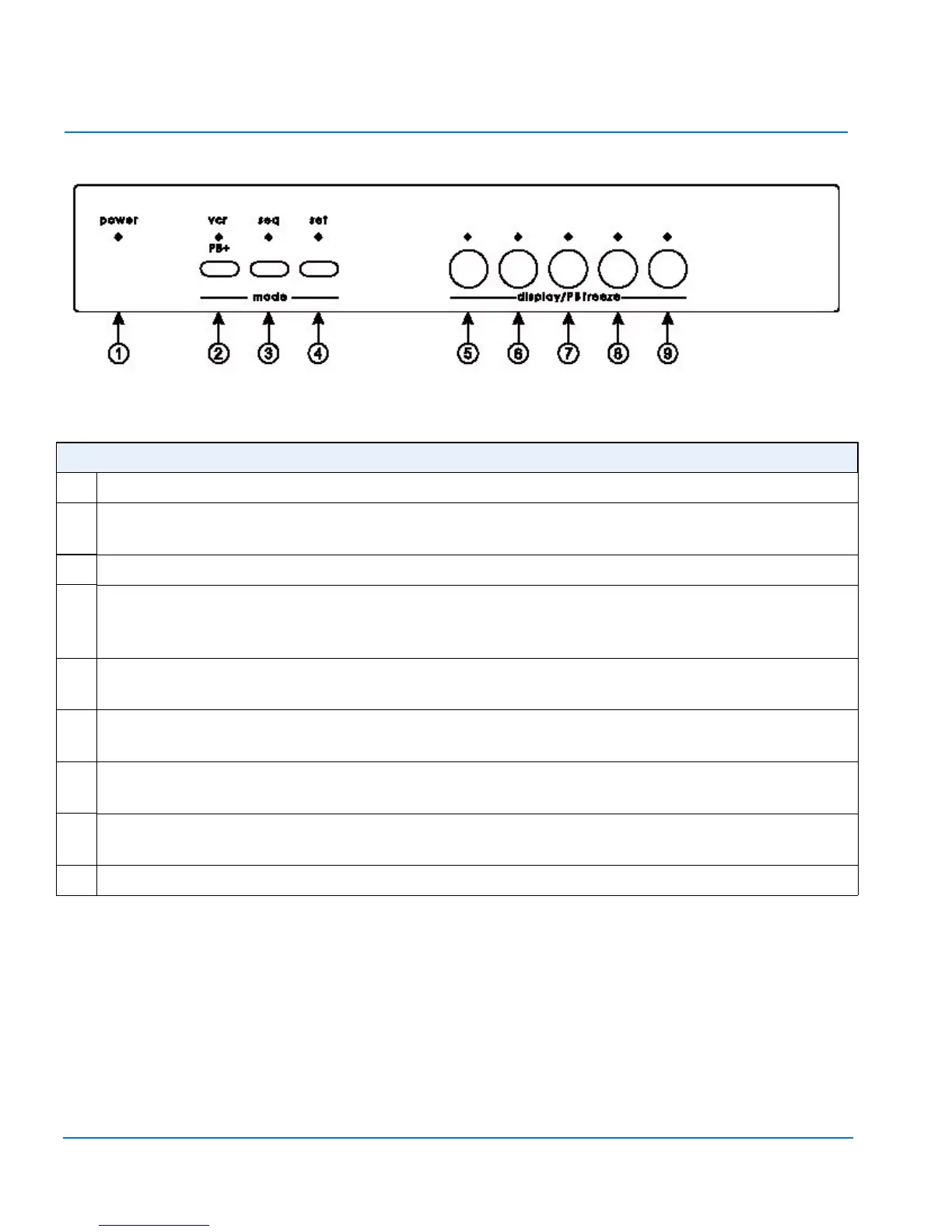
PREMIUM QUAD PROCESSOR FRONT PANEL CONTROLS
1power — Green LED indicates the unit is on.
2 vcr/PB+ — Places unit in playback mode. Selects DIRECT for VCR setup, or FRAME or
FIELD for playback. Changes display 5–8 buttons to zoom or freeze function.
3seq — Begins or ends sequential display of full screen images at programmed dwell rate.
4set — Pressing set and display 9 button simultaneously begins or ends menu setup.
Pressing display 7 simultaneously with set restores factory default settings. Pressing set
while in playback mode returns monitor output to a live display.
5 display 5 — Displays camera 1 full screen in live mode. In playback mode, zooms or
freezes image in first quadrant. Selects alphanumeric character in menu setup.
6 display 6 — Displays camera 2 full screen in live mode. In playback mode, zooms or
freezes image in second quadrant. Selects alphanumeric character in menu setup.
7 display 7 — Displays camera 3 full screen in live mode. In playback mode, zooms or
freezes image in third quadrant. Moves cursor forward in menu setup.
8 display 8 — Displays camera 4 full screen in live mode. In playback mode, zooms or
freezes image in fourth quadrant. Moves cursor backwards in menu setup.
9 display 9 — Displays all four images in live or playback mode.


 To Next Page
 Loading...