Page 6 <&(%$*4.8"4,7%H'*#$"&8#I%/7*,#*%4,77%JKLLLKLMMKNOPO1 Item 64001
?@<6AQ RS6;@ACRE D@CEA6E@ET6?6AFS
R/*(,$"83%C8#$('4$"&8#
%;*,9%$.*%6EAC;6%CDSR;A@EA%?@<6AQ%CE<R;D@ACRE%#*4$"&8%
,$%$.*%+*3"88"83%&2%$."#%5,8',7%"847'9"83%,77%$*Z$%'89*(%
#'+.*,9"83#%$.*(*"8%+*2&(*%#*$%'/%&(%'#*%&2%$."#%/(&9'4$1
V*8*(,7%R/*(,$"83%C8#$('4$"&8#
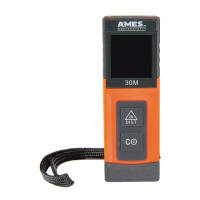
S&)*("83%D*$*(%R8%,89%R22
1� Press to power Meter on�
2� Hold
T
to power Meter off�
?*7*4$"83%F8"$#
Press and
T
at the same time to switch between measurement units�
?*7*4$"83%;*2*(*84*%S&"8$
Press
T
to change laser reference point between front,
center, and rear of Meter�
@'$&%S&)*(KR22
If Meter is not used for approximately 5 minutes, it will
automatically power off to preserve battery power�
D*,#'(*5*8$%R/*(,$"&8
?"837*%D*,#'(*5*8$%D&9*
1� Press to power Meter on�
Meter automatically enters
single measurement mode�
2� Press again to turn laser on�
Laser On Icon flashes on Display�
3� Aim laser at target to be measured�
4� Press again to begin measuring�
5� Read measured distance on Display�
6� Repeat steps to take additional
measurements� Up to two
previous measurements are
held on the Auxiliary Display
until Meter is powered off�
T&8$"8'&'#%D*,#'(*5*8$%D&9*
1� Press to power Meter on�
2� Hold for a few seconds to begin
continuous measurement�
3� Move laser between two points to be
measured and read measurement
from Display as it changes�
4� Press again to stop
measurement and turn laser off�


 To Next Page