Home
AMLOGIC
Computer Hardware
S912
Page 21 (Display Settings and Output Modes)
AMLOGIC S912 - Display Settings and Output Modes
30 pages
Manual
Save Page as PDF
To Next Page
To Next Page
To Previous Page
To Previous Page
Loading...
8..2
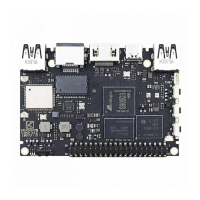
Display settings
8.2.1
Auto
output
mode:
Turn on
“
Auto
output
mode button
”
8.2.2 Select
output
mode by
hand:
Turn
off
“
Auto
output
mode”
,
Click
HDMI
output
mode setting
Select
the mode
in
the pop-up
list
Presss
ok to
confirm and back
20
22
Table of Contents
Main Page
default chapter
1
Table of Contents
1
Chapter 1 Overview
2
Chapter 5 Main Menu
6
Chapter 6 Local Media Play
8
Chapter 7 About App
10
Chapter 8 Setting
17
Chapter 10 Update
26
Chapter 12 Troubleshooting
27
Related product manuals
AMLOGIC S905D3
72 pages
AMLOGIC AML 6210DP
24 pages


 To Next Page