Panel Instruction & Basic Operation
Top Panel
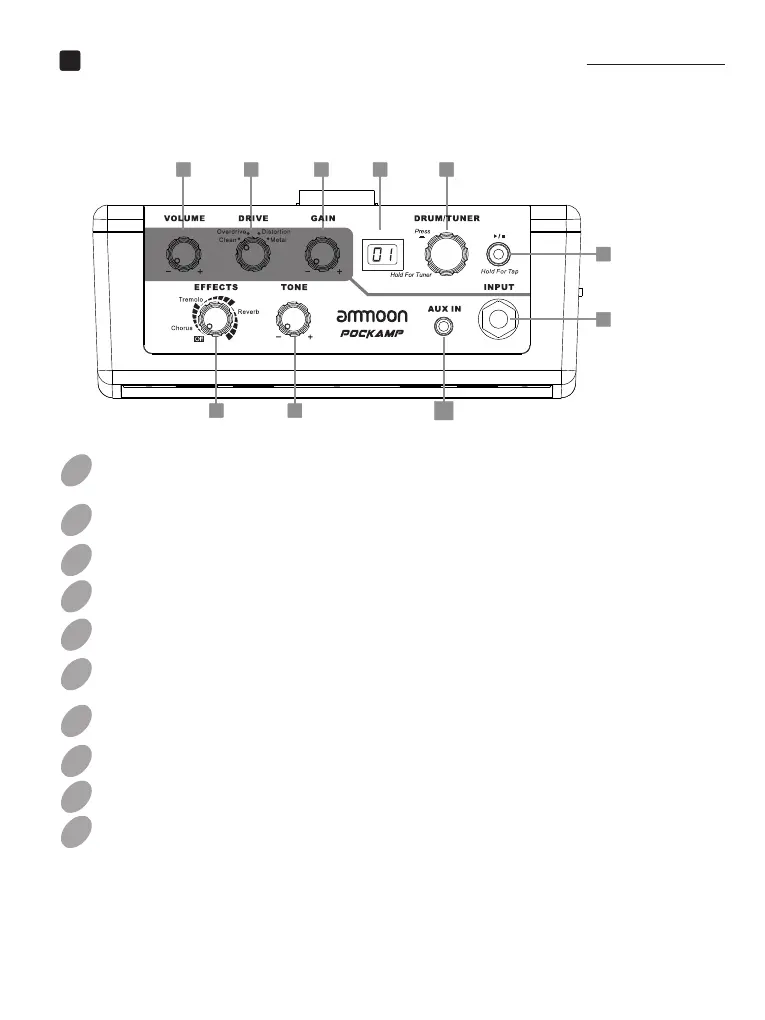
DRUM/TUNERButton: Press the button to switch between 3 Drum items.
Channel Switch: Select channels between Clean/Overdrive/Distortion/Metal.
Press and hold this button to activate Tap Tempo.
LED Button: Press this button to start/stop the drum machine.
EFFECTS Knob: Select DSP effects (between Chorus/Tremolo/
Rotate the knob to adjust Drum parameters.Hold the button to enter tuner.
Reverb) and adjust modulation rate or reverb level (turn clockwise to increase).
VOLUME Knob: Control the output volume.
Display: Instruct the information of Drum Rhythm or tuner.
INPUTJack: 1/4” mono audio jack.
AUXIn Jack: 1/8” stereo audio jack
GAIN Knob: Adjust the gain of the DRIVE effects.
TONE Knob: Adjust the brightness of the sound.
02
03
04
01
05
06
07
08
09
10
EN
3
7 4 8 2
1
9
1056


 To Next Page