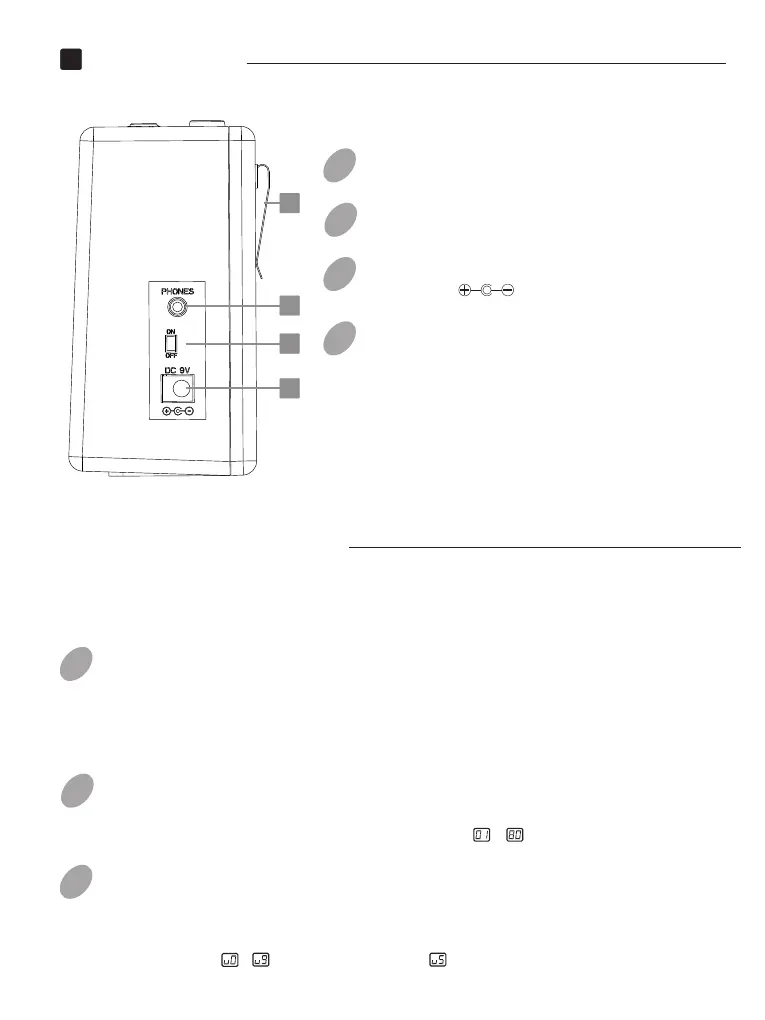
Side Panel
1
1
12
12
11
14
13
Detailed Functions
Drum Rhythm
Selecting Drum Rhythm Types
Adjusting Drum Rhythm Volume
Start/Stop Drum Rhythm
Press [Play/Stop] button will start the drum rhythm ( [Play/Stop]
button’s LED will be lit up). When the rhythm is playing, press
[Play/Stop] button again to stop.
LED screen will show the rhythm type firstly, then rotate the
knob to [DRUM/TUNER]
Press [DRUM/TUNER]button, LEDscreen will show the drum
rhythm volume, then rotate [DRUM/TUNER] knob to change the
rhythm volume ( ~ , the default value is ).
select the rhythm type ( ~ ).
PHONESJack:
1/8” stereo audio jack.
11
POWERSwitch:
.Power On/Off
12
DC9V Jack:
9V DC 1.5A
13
HOOK:
For hanging Super Tiny Twin at waist.
14
01
02
03
EN


 To Next Page