4
UNIT WILL NOT TURN ON
• Is unit plugged in?
SOUND IS MUFFLED
• Bass too high ● Treble too low
FEEDBACK: A LOUD SQUEALING, SHRILL OR HOWLING
SOUND THAT IS SELF GENERATED
• Feedback occurs when a microphone is too close to the
speaker or the microphone volume is too high, or the micro-
phone is pointed towards the speaker. It is also caused by
sound reflecting off hard surfaces.
• Reduce or eliminate Feedback by
- Pointing the microphone in a different direction
- Keeping the microphone BEHIND the speakers
- Turn down the volume levels
POWER IS ON, BUT NO SOUND
• Check main volume level.
• If using wireless, be sure receiver and transmitter battery is
installed and both units are turned on.
MICROPHONE SIGNAL IS WEAK
• If microphone has batteries, check batteries.
• Check cables/connectors.
WIRELESS MIC DOES NOT WORK
• Check that transmitter batteries are fully charged and ensure
transmitter is on.
• Does yellow “signal” LED light when transmitter is turned on?
• Are the transmitter and receiver on the same channel (1-16)?
WIRELESS MIC CUTS IN AND OUT
• Is unit visible (line of sight) from user? If not, move unit into view
when using wireless microphone.
• Does the yellow “signal” LED go out when signal drops out? Check
battery in transmitter.
MAKES BUZZING NOISE
• Check cables – a damaged cable will cause this. Unplug cables one
at a time until buzzing stops.
• Check for Ground loops – use a ground loop isolator where
needed.
NEED HELP? Call 800-267-5486
Amplivox Portable Sound Systems ● 650 Anthony Trail, Suite D, Northbrook, IL 60062
ph. 800-267-5486 ● fx. 800-267 5489 ● web: www.ampli.com ● email: customerservice@ampli.com
MICROPHONE OPERATION AND STATUS DISPLAY
• TURN ON MICROPHONE: Push and hold the
“POWER/MUTE” (3) button until LCD screen
lights up.
• TO MUTE: Press “POWER/MUTE” button
twice to MUTE. Channel number will flash when
muted. Press button again twice to remove
“MUTE”.
• TURN OFF MICROPHONE: Push and hold the
“POWER/MUTE” (3) button for 2 seconds to
turn microphone “OFF”.
• SELECT CHANNEL (Manual): Press and hold
the “SELECT” (4) button for 2 seconds until you
only see the word Channel and channel num-
ber. To change channel, when flashing, press
the “SELECT” (4) button until you reach the
desired channel. Flashing will stop after 10
seconds and channel is now set.
• LOCK / UNLOCK CHANNEL: Push the
“POWER/MUTE” (3) button and “SELECT”
button at the same time to lock or unlock chan-
nel. When locked, channel cannot be changed.
“LOCKED” symbol appears in upper left-hand
corner.
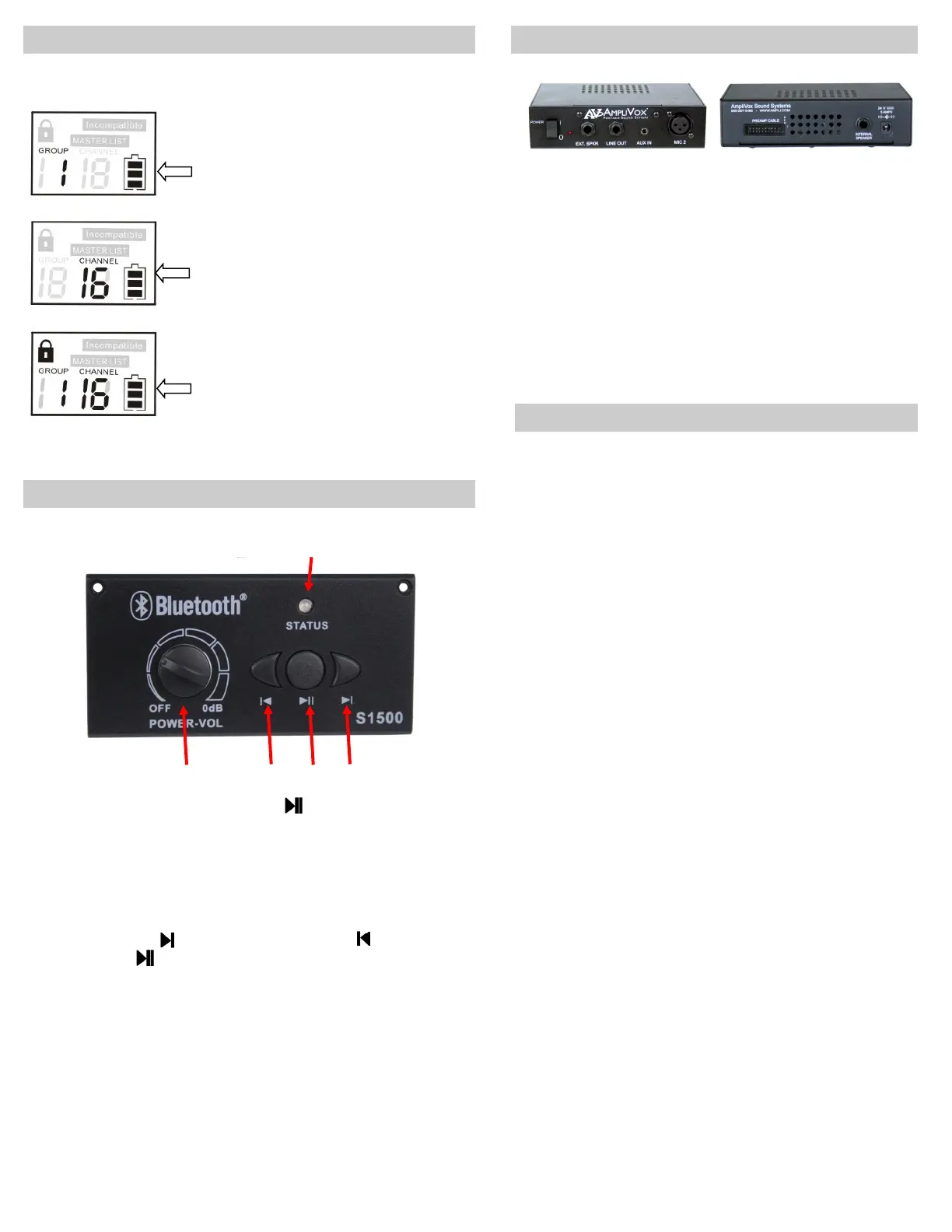
BLUETOOTH MODULE - MODEL S1500
• With main power switch (L) on, press
button (M) to turn Bluetooth pair-
ing on and hold for 4 seconds to enter into the pairing mode.
• The RED LED (N) will start to flash, searching for a Bluetooth signal. Search
function will stay active for 10 minutes. If no signal is found ,this function will
shut off. During the search function turn on your Bluetooth device for pairing.
On your Bluetooth menu of your device, choose AmpliVox or use pin code
0000. Once paired, red LED will stay on.
• Use this button
(0) to move to the next song or (P) to play previous
song. Use
(M) to pause. When paused you will need to press again to
start playing.
• VOLUME CONTROL (L) Use to adjust the volume of the Bluetooth material.
• NOTE: Always turn off Bluetooth power before turning main power off. If you
turn off main power first, you will need to cycle thru a power off/on the next
time you use the Bluetooth module.
“The Bluetooth® word mark and logos are registered trademarks owned by Bluetooth SIG,
Inc. and any use of such marks by Amplivox Portable Sound Systems is under license.
Other trademarks and trade names are those of their respective owners.
N
L P M
O
150 WATT AMPLIFIER
PROBLEM SOLVING
SEPT,2017
• MIC 2: XLR connector for
external wired microphone
• AUX IN: 1/8" (3.5mm)
connector . Use for connecting
to other electronics.
• LINE OUT: 1/4" connector.
Use for connecting to other
electronics.
• EXTERNAL SPEAKER:
1/4" connector. For
external speaker use.
• AMPLIFIER POWER :
ON / OFF SWITCH


 To Previous Page
 Loading...