3
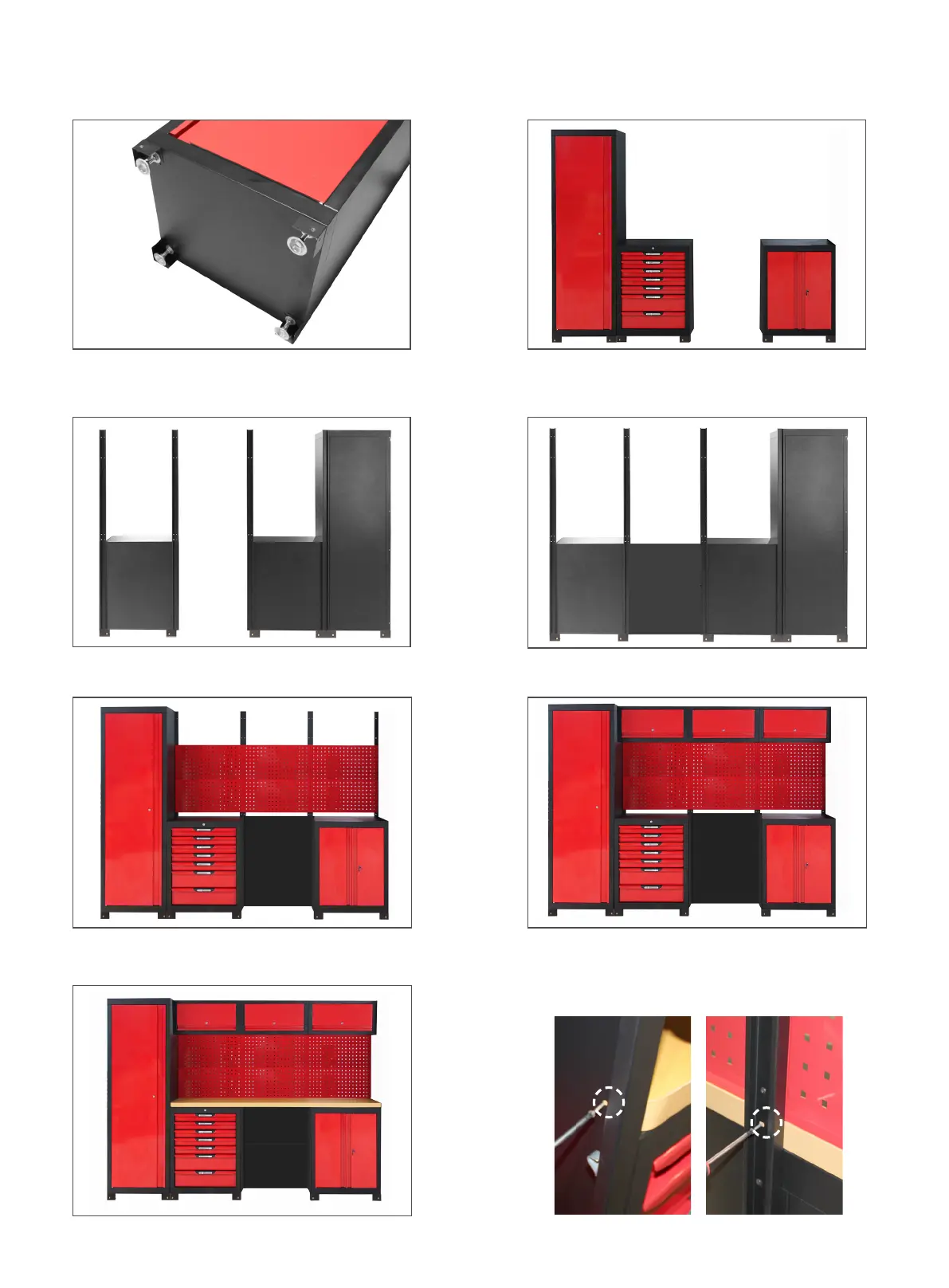
Step 2:Place T47808, T47805 & T47809
according to desired order and position.
Step 3:Install 4 connector posts (T47811) at the
rear of the unit using provided M5 x 12mm bolts
(GS007).
Step 4:Install 2 rear panels (T47819) at the
rear of the unit using provided M5 x 12mm bolts
(GS007).
Step 5:Install 6 pegboards (T47810) using
provided M5 x 12mm bolts (GS007).
Step 6:Install 3 wall cabinets (T47806) using
provided M5 x 12mm bolts (GS007).
Step 7:Attach MDF worktop (T47814).
Step 1:Install adjustable legs (GS001) and fixed
legs (GS002) under T47808, T47805 & T47809.
Use M6 x 12mm bolts (GS006) to fasten fixed legs.
Fasten the interior of tall cabinet (T47805) to the
worktop using supplied screws (GS011). Fasten
the rear of each connector post (T47811) to the
worktop using supplied screws (GS011).


 To Next Page
 Loading...