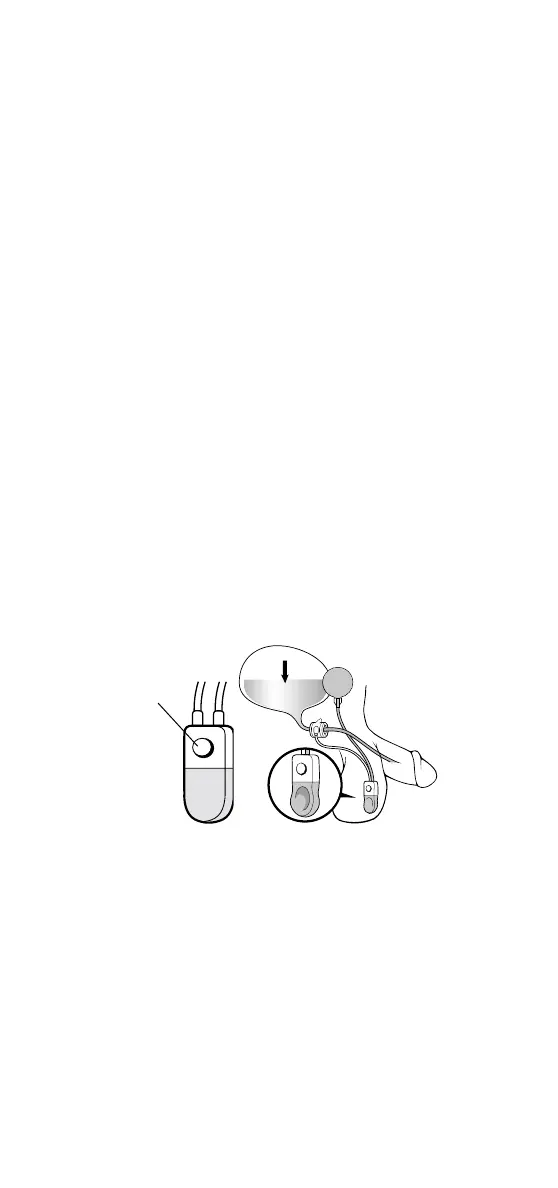
To deactivate the AMS 800
™
Urinary Control System:
1. Squeeze and release the lower part of the
control pump several times, just as you
would do to urinate.
2. After completely emptying the cuff (the
cuff is empty when the pump remains
flat), allow the pump bulb to partially
refill (about 30-60 seconds). When the
control pump is partially refilled, firmly
press the deactivation button on the top
of the control pump. After pressing the
deactivation button, you will still feel the
button on the upper part of the pump.
Pressing the deactivation button locks out
the flow of fluid through the control pump.
When the device is properly deactivated, a
slight indentation will be felt at the center
of the soft part of the pump. The cuff will
now remain open (Figure 6).
When the
AMS 800
™
Urinary Control System
is deactivated, the cuff around your urethra
will not stop the flow of urine. You should
use pads while the AMS 800™ Urinary Control
System is deactivated.
What happens if the deactivation button
is squeezed accidentally? The device will
deactivate and two problems could occur.
6
Figure 6
deactivation
button


 To Next Page