PRODUGT OPERATING
Battery storage and charging
Place charging docking station
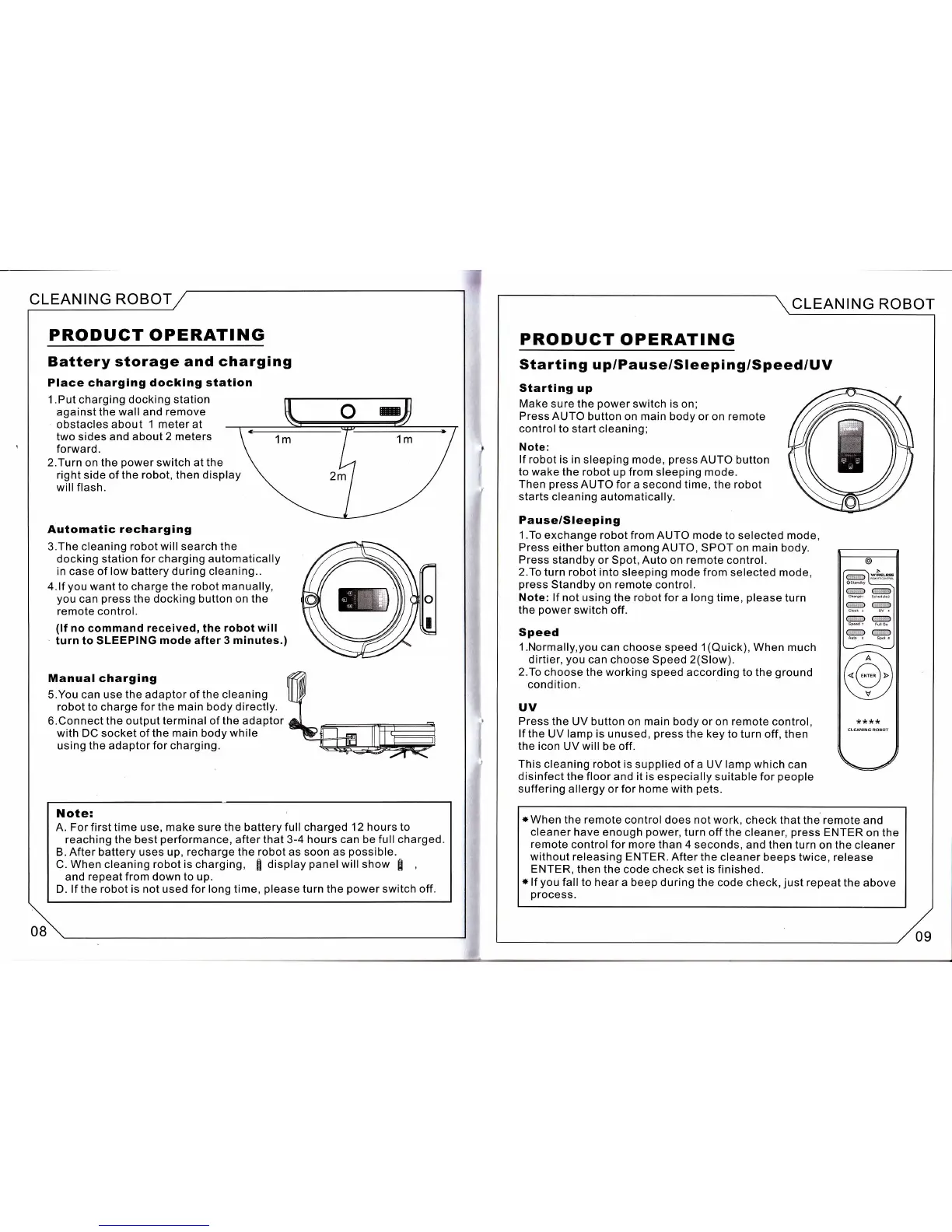
1.Put charging docking station
against
the wall and
remove
obstacles about
1 meterat
two sides and about
2 meters
forward.
2.Turn
on
the
power
switch at the
right side of the
robot,
then display
willflash.
Automatic
recharging
3.The cleaning
robot will search the
docking station
for
charging automatically
in case of low battery during cleaning..
4.lf
you
want to charge the robot manually,
you
can
press
the docking button
on the
remote control.
(lf
no
command
received, the robot will
'
turn to SLEEPING
mode
after 3
minutes.)
Manual charging
S.You can use the adaptor of the cleaning
robot to charge for the main body directly.
6.Connect the output terminal of the adaptor
with DC socket of the main body
while
using the adaptor
for charging.
X.?'"?i,r., time use,
make
sure
the battery full charged 12 hours to
reaching the best
performance,
after
that
3-4
hours can be full charged.
B. After battery uses up, recharge the robot as soon as
possible.
C.
When
cleaning
robot is charging,
fi
display
panelwill
show
f
and repeat
from
down to up.
D. lf the robot is not used for long time,
please
turn
the
power
switch off.
CLEANING ROBOT
,6
rl
.r
".t,
$-
ct
g
t
tiB
fi
u
t
{
08
09
CLEANING ROBOT
PRODUCT
OPERATING
Starti n
g
u
p/Pause/Sleepi
ng/Speed/UV
Starting
up
Make
sure the
power
switch is on;
Press AUTO
button on main body or on remote
control to start cleaning;
Note:
lf robot is in
sleeping mode,
press
AUTO button
to wake
the robot up from sleeping mode.
Then
press
AUTO for
a second time, the robot
starts cleaning
automatically.
Pause/SIeeping
1 .To
exchange robot from AUTO mode
to selected mode,
Press
either
button among AUTO, SPOT on main body.
Press
standby or Spot, Auto on remote control.
2.To
turn robot into
sleeping mode from selected mode,
press
Standby on
remote
control.
Note:
lf not using the robot for
a
long
time,
please
turn
the
power
switch off.
Speed
l.Normally,you
can choose speed 1(Quick), When much
dirtier,
you
can choose Speed 2(Slow).
2.To
choose the working speed according
to the
ground
cond ition.
UV
Press
the UV button on main body
or on remote control,
lf
the UV lamp is
unused,
press
the key to turn off, then
the icon
UV will be off.
This
cleaning robot is supplied of a
UV
lamp which
can
disinfect the floor
and
it is
especially suitable for
people
suffering allergy
or
for home
with
pets.
*
When
the remote control does not work,
check that the remote
and
cleaner have enough
power,
turn off the cleaner,
press
ENTER
on the
remote
control for more
than
4
seconds, and then turn
on the cleaner
without releasing
ENTER. After the cleaner
beeps twice, release
ENTER,
then the code check set is finished.
*
lf
you
fall to hear
a beep during the code
check,
just
repeat
the
above
process.


 To Next Page
 Loading...