EasyManua.ls Logo

AmTidy A325 - PRODUCT MAINTAINING - Dustbin, Filter, and Sensors; Dustbin and Filter Cleaning; Sensor Cleaning and Maintenance

AmTidy A325
12 pages
Print Icon
To Next Page IconTo Next Page
To Previous Page IconTo Previous Page
Loading...
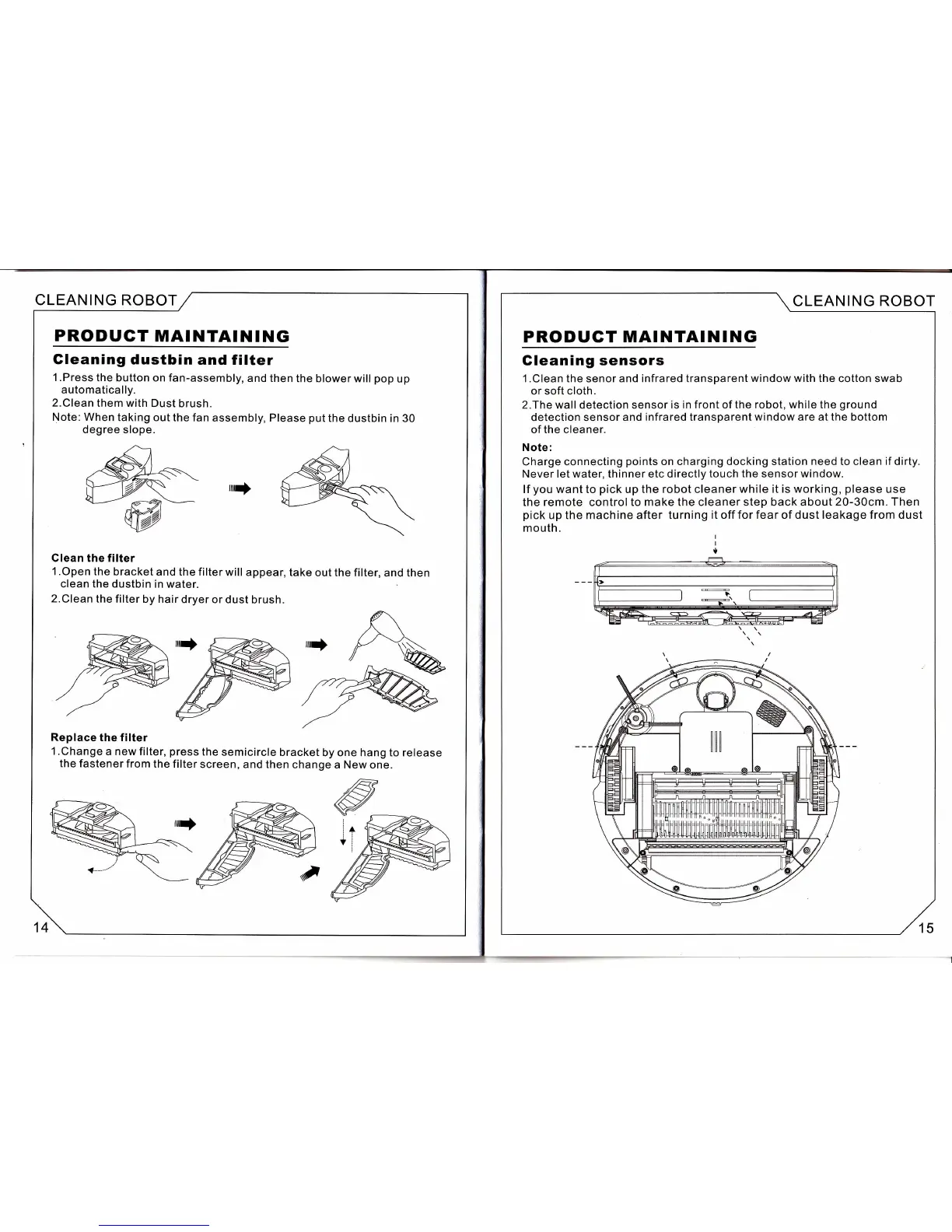
CLEANING
ROBOT
PRODUGT
MAINTAINING
Gleaning
dustbin
and filter
1 .Press
the button
on fan-assembly,
and
then the blower
will
pop
up
automatically.
2.Clean
them with
Dust brush.
Note: When
taking
out the fan
assembly, Please
put
the
dustbin in 30
degree slope.
rrrrf
Clean the
filter
1 .Open
the bracket
and the filter
will
appear, take
out the filter,
and then
clean the
dustbin in water.
2.Clean the
filter by hair
dryer
or dust brush.
Replace
the filter
1 .Change
a new filter,
press
the
semicircle
bracket
by one hang to release
the
fastener
from
the filter
screen,
and then
change a New one.
14
CLEAN
ING ROBOT
PRODUGT MAINTAINING
Gleaning
sensors
1
.Clean the senor and
infrared transparent
window with the
cotton swab
or soft cloth.
2.The wall
detection
sensor is in
front
of
the robot, while the
ground
detection sensor and
infrared transparent
window
are at the bottom
of the cleaner.
Note:
Charge connecting
points
on charging docking station
need
to clean
if
dirty.
Never let water, thinner etc directly
touch the
sensor
window.
lf
you
want to
pick
up the robot cleaner
while it is working,
please
use
the
remote
controlto
make the cleaner step back about
20-30cm. Then
pick
up the machine after turning
it off for fear of dust leakage from dust
mouth.
15