890121234567890123456789012345678901212345678901234567890123456789012123456789012345678901234567890121234567890123456789012345678901212345678901234567890123
8
9012123456789012345678901234567890121234567890123456789012345678901212345678901234567890123456789012123456789012345678901234567890121234567890123456789012
9012123456789012345678901234567890121234567890123456789012345678901212345678901234567890123456789012123456789012345678901234567890121234567890123456789012
9012123456789012345678901234567890121234567890123456789012345678901212345678901234567890123456789012123456789012345678901234567890121234567890123456789012
9012123456789012345678901234567890121234567890123456789012345678901212345678901234567890123456789012123456789012345678901234567890121234567890123456789012
9012123456789012345678901234567890121234567890123456789012345678901212345678901234567890123456789012123456789012345678901234567890121234567890123456789012
9012123456789012345678901234567890121234567890123456789012345678901212345678901234567890123456789012123456789012345678901234567890121234567890123456789012
9012123456789012345678901234567890121234567890123456789012345678901212345678901234567890123456789012123456789012345678901234567890121234567890123456789012
9012123456789012345678901234567890121234567890123456789012345678901212345678901234567890123456789012123456789012345678901234567890121234567890123456789012
9012123456789012345678901234567890121234567890123456789012345678901212345678901234567890123456789012123456789012345678901234567890121234567890123456789012
9012123456789012345678901234567890121234567890123456789012345678901212345678901234567890123456789012123456789012345678901234567890121234567890123456789012
9012123456789012345678901234567890121234567890123456789012345678901212345678901234567890123456789012123456789012345678901234567890121234567890123456789012
9012123456789012345678901234567890121234567890123456789012345678901212345678901234567890123456789012123456789012345678901234567890121234567890123456789012
9012123456789012345678901234567890121234567890123456789012345678901212345678901234567890123456789012123456789012345678901234567890121234567890123456789012
9012123456789012345678901234567890121234567890123456789012345678901212345678901234567890123456789012123456789012345678901234567890121234567890123456789012
9012123456789012345678901234567890121234567890123456789012345678901212345678901234567890123456789012123456789012345678901234567890121234567890123456789012
9012123456789012345678901234567890121234567890123456789012345678901212345678901234567890123456789012123456789012345678901234567890121234567890123456789012
9012123456789012345678901234567890121234567890123456789012345678901212345678901234567890123456789012123456789012345678901234567890121234567890123456789012
9012123456789012345678901234567890121234567890123456789012345678901212345678901234567890123456789012123456789012345678901234567890121234567890123456789012
3
890121234567890123456789012345678901212345678901234567890123456789012123456789012345678901234567890121234567890123456789012345678901212345678901234567890123
System Configuration
14
Language Setup Page
NOTE: Subtitle language menu lan-
guage are only valid to the setup of
DVD discs.
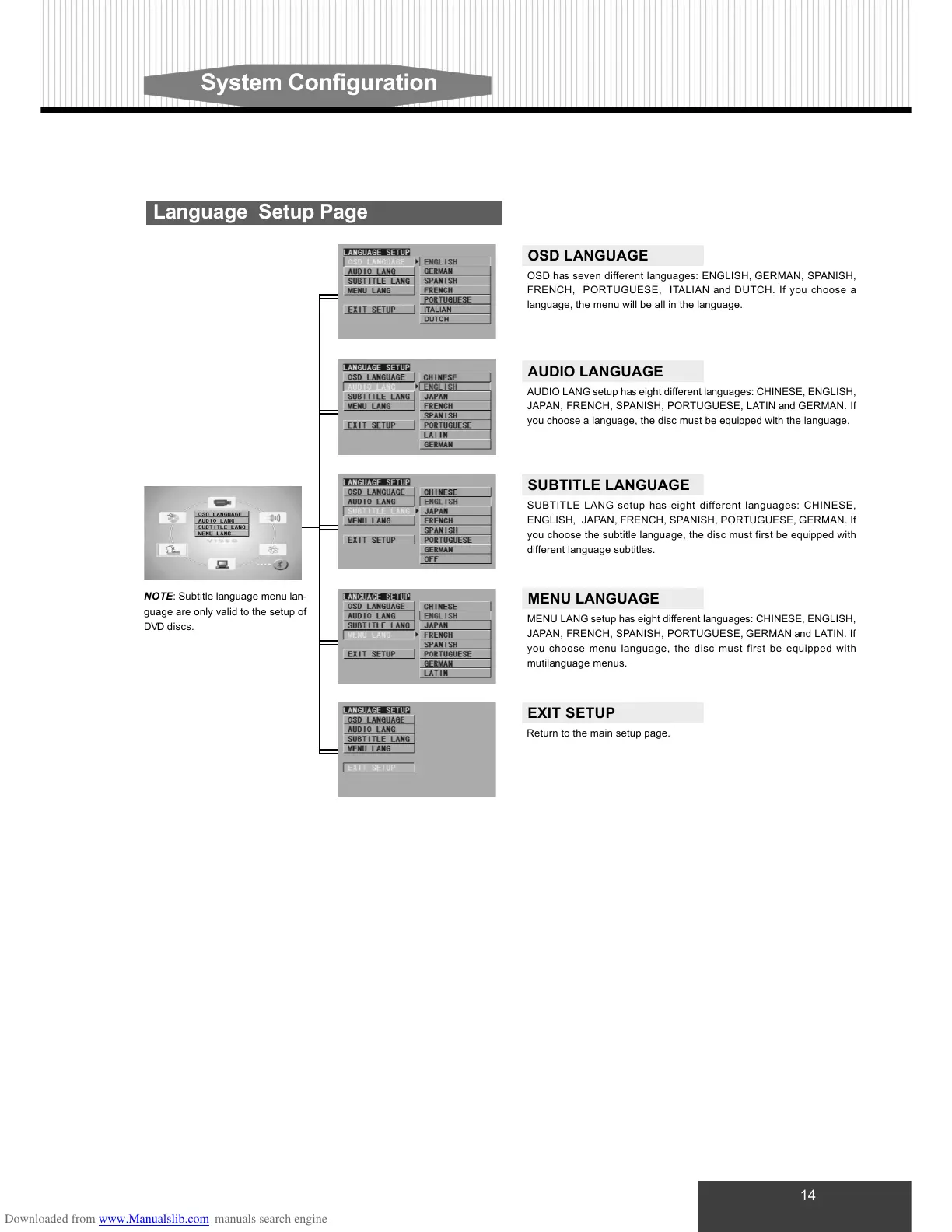
OSD LANGUAGE
OSD has seven different languages: ENGLISH, GERMAN, SPANISH,
FRENCH, PORTUGUESE, ITALIAN and DUTCH. If you choose a
language, the menu will be all in the language.
AUDIO LANGUAGE
AUDIO LANG setup has eight different languages: CHINESE, ENGLISH,
JAPAN, FRENCH, SPANISH, PORTUGUESE, LATIN and GERMAN. If
you choose a language, the disc must be equipped with the language.
SUBTITLE LANGUAGE
SUBTITLE LANG setup has eight different languages: CHINESE,
ENGLISH, JAPAN, FRENCH, SPANISH, PORTUGUESE, GERMAN. If
you choose the subtitle language, the disc must first be equipped with
different language subtitles.
MENU LANGUAGE
MENU LANG setup has eight different languages: CHINESE, ENGLISH,
JAPAN, FRENCH, SPANISH, PORTUGUESE, GERMAN and LATIN. If
you choose menu language, the disc must first be equipped with
mutilanguage menus.
EXIT SETUP
Return to the main setup page.



 To Next Page