3. Using the Scan Tool
1
4
2
8
ASsoo
OBDII/EOBD+CAN
0K
6
5
3
7
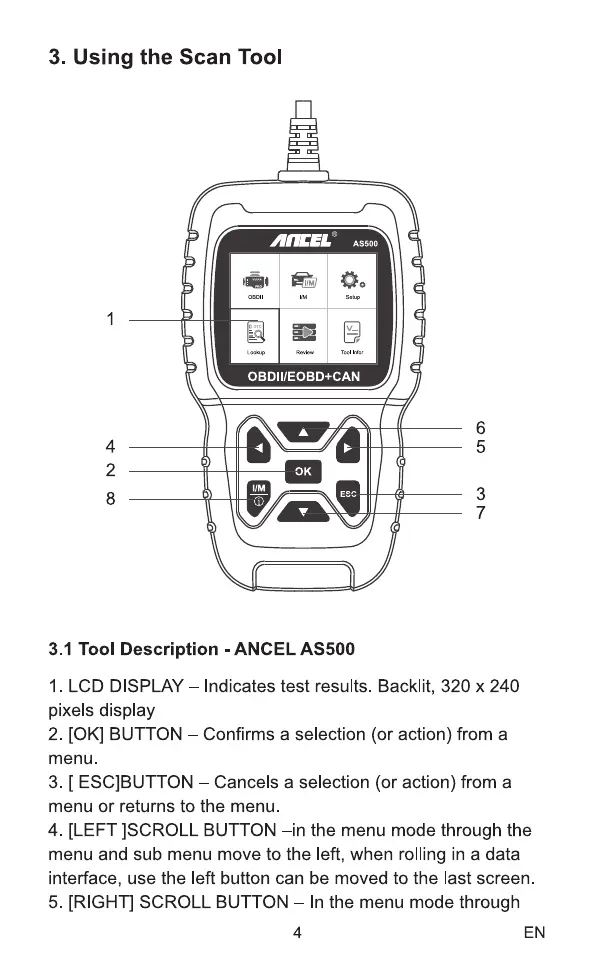
3.1 Tool Description - ANCEL AS500
1. LCD DISPLAY Indicates test results. Backlit, 320 x 240
pixels display
2. [0K] BUTTON —Confirms a selection (or action) from a
menu.
3. [ ESC]BUTTON —Cancels a selection (or action) from a
menu or returns to the menu.
4. [LEFT ]SCROLL BUTTON -in the menu mode through the
menu and sub menu move to the left, when rolling in a data
interface, use the left button can be moved to the last screen
5. [RIGHT] SCROLL BUTTON In the menu mode through
4 EN



 To Next Page