the menu and sub menu item move to the right, when rolling in
the data interface, use the right button can be moved to the
next screen
6. [UP] SCROLL BUTTON - In the menu mode through the
menu and sub menu item moving up. When retrieving data for
more than a screen by moving up the screen to the previous
screen for more data
7. [DOWN] SCROLL BUTTON - In the menu mode through
the menu and sub menu item moves down. When retrieving
data more than one screen, by moving down the screen to the
next screen for more data
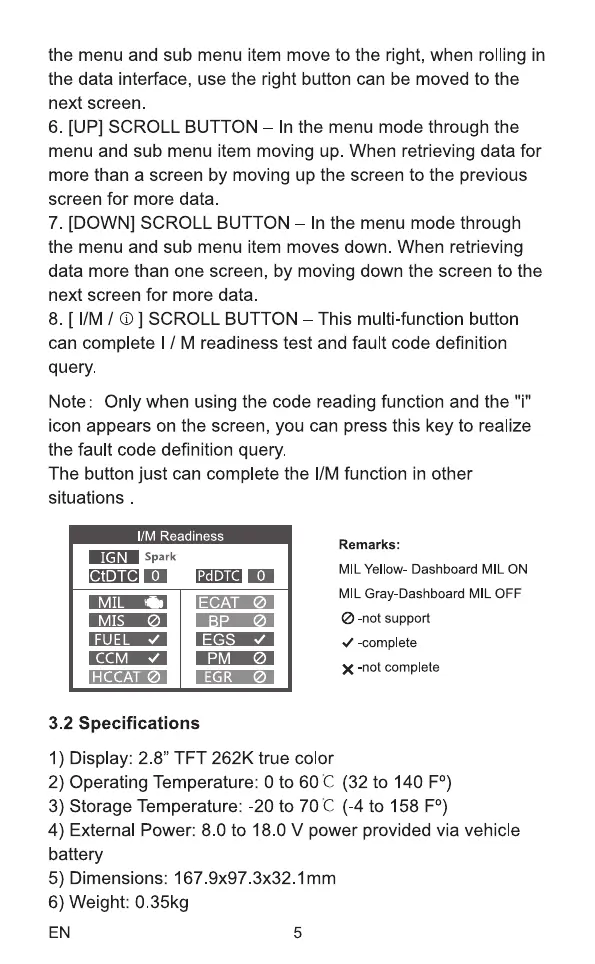
8. [ I/M / O ] SCROLL BUTTON - This mufti-function button
can complete I / M readiness test and fault code definition
query.
Note: Only when using the code reading function and the i
icon appears on the screen, you can press this key to realize
the fault code definition query.
The button just can complete the 11Mfunction in other
situations
I/M Readiness
IGN Spark
CtDTC O
MIS
HCCAT
PdDTC
EGS
EGR
Remarks:
MIL Yellow- Dashboard MIL ON
MIL Gray-Dashboard MIL OFF
@-not support
-complete
X -not complete
3.2 Specifications
1) Display: 2.8" TFT 262K true color
2) Operating Temperature: Oto 60C (32 to 140 FO)
3) Storage Temperature: -20 to 70C (-4 to 158 FO)
4) External Power: 8.0 to 18.0 V power provided via vehicle
battery
5) Dimensions: Imm
6) Weight: 0.35kg
EN 5



 To Next Page