3.3 Accessories Included
I) User's Manual - Instructions on tool operations
2) USB cable - Used to upgrade the scan tool
3.4 Lookup
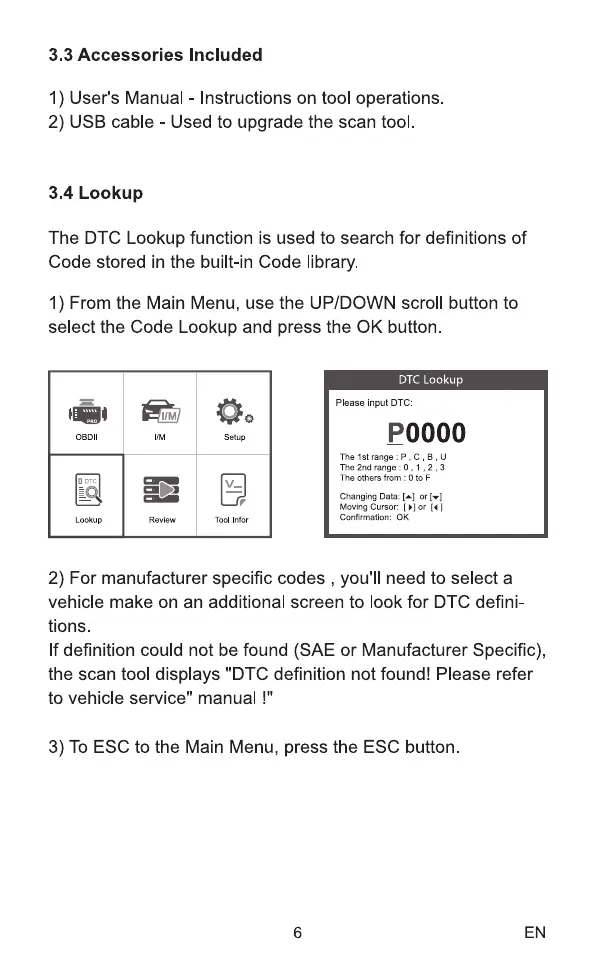
The DTC Lookup function is used to search for definitions of
Code stored in the built-in Code library.
1) From the Main Menu, use the UP/DOWN scroll button to
select the Code Lookup and press the 0K button
OBOI
Lookup
Review
Setup
Tool Infor
DTC Lookup
Please input DTC:
POOOO
The 1st range : P, C, B, U
The 2nd range O , I , 2,3
The others from : O to F
Changing Data: or
Moving Cursor: [ or [4]
Confirmation: 0K
2) For manufacturer specific codes , you'll need to select a
vehicle make on an additional screen to look for DTC defini-
tions.
If definition could not be found (SAE or Manufacturer Specific),
the scan tool displays "DTC definition not found! Please refer
to vehicle service" manual !"
3) To ESC to the Main Menu, press the ESC button.
6 EN



 To Next Page