BD310
Setup
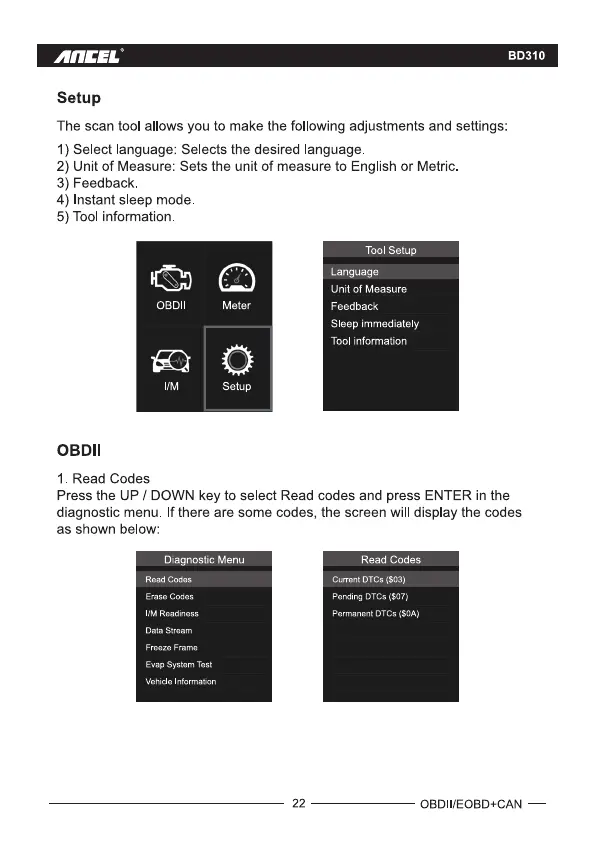
The scan tool allows you to make the following adjustments and settings:
1) Select language: Selects the desired language
2) Unit of Measure: Sets the unit of measure to English or Metric.
3) Feedback.
4) Instant sleep mode.
5) Tool information
OBDI
1M
OBDII
1 Read Codes
Meter
Setup
Tool Setup
Language
Unit Of Measure
Feedback
Sleep immediately
Tool information
Press the UP / DOWN key to select Read codes and press ENTER in the
diagnostic menu. If there are some codes, the screen will display the codes
as shown below:
Diagnostic Menu
Read Codes
Erase Codes
WM Readiness
Data Stream
Freeze Frame
Evap System Test
Vehicle Information
22
Read Codes
current OTCs ($03)
pending OTCs (SO?)
Permanent OTCs (SOA)
OBDII/EOBD+CAN —



 To Next Page