Home
ANCEL
Diagnostic Equipment
V6
Page 10 (2.2 Front View Overview)
ANCEL V6 - 2.2 Front View Overview
36 pages
Manual
Save Page as PDF
To Next Page
To Next Page
To Previous Page
To Previous Page
Loading...
7
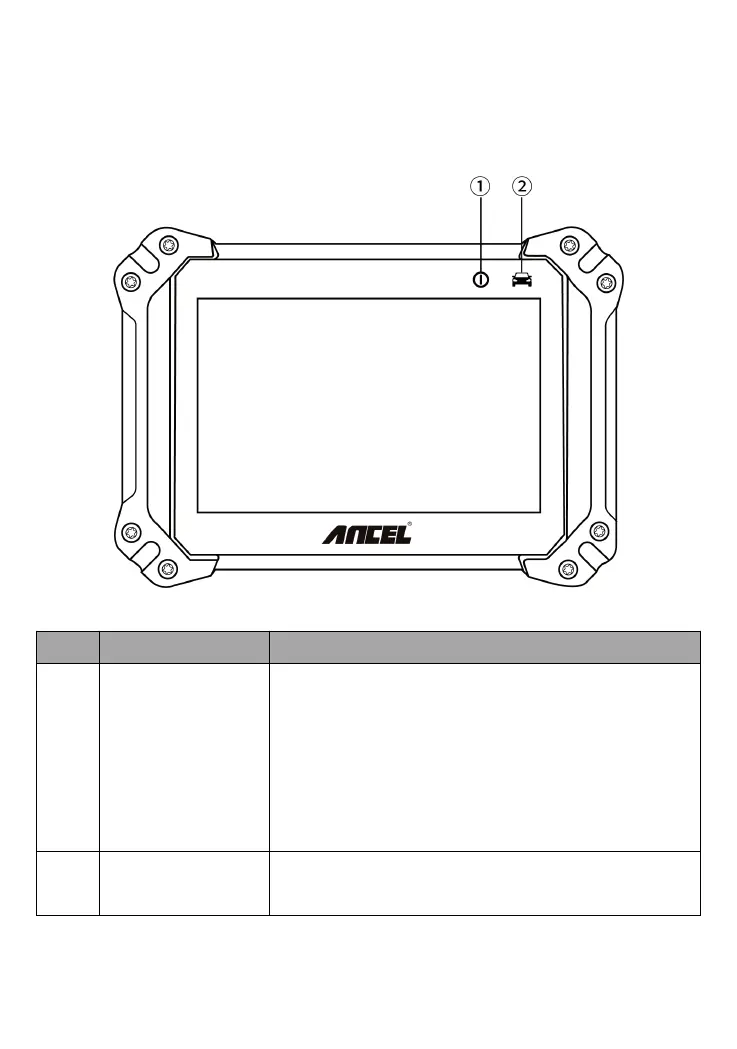
2.2
The
front
view
of
Ance
l
V6
tablet
No.
Name
Description
①
Power
Indica
tor
Lights
on
green
whe
n
po
wer
on
and
the
battery
is
higher
than
20%
Lights
on
re
d
when
power
on
and
the
battery
is
lower
than
20%
Lights
on
blue
when
it
is
charging
Lights
on
green
when
it
is
f
ull
charge
②
Communicai
ton
Indicator
The
light
flashing
when
diagn
ose
communicati
on
9
11
Table of Contents
Main Page
Table of Contents
3
Statement
4
Agreement
4
Copyright Information
4
Disclaimer
5
Safety Information
5
Inspection Precautions
6
Product Description
9
Product Overview
9
The Front View of Ancel V6 Tablet
10
The Top View of Ancel V6 Tablet
11
The Back View of Ancel V6 Tablet
12
The Product Specifications
12
Product Software Introduction
14
Diagnosis
14
Hot Function
18
Update
18
Data Manager
20
Quick Support
20
DTC Query
21
Feedback
22
Settings
23
Product Activation
27
Cleaning and Maintenance and Warranty
29
Cleaning and Maintenance
29
Warranty
30
Related product manuals
ANCEL VD500
72 pages
ANCEL VD700
29 pages
ANCEL VOD700
25 pages
ANCEL X6
44 pages
ANCEL X7
44 pages
ANCEL X7 HD
36 pages
ANCEL S1000
5 pages
ANCEL X6 HD
36 pages
ANCEL FX2000
27 pages
ANCEL HD3400
32 pages
ANCEL HD3600
32 pages
ANCEL HD Series
32 pages



 To Next Page