3. Description of appearance and
buttons
Multi-system scanner
VOD700
READ
11M
Esc
6
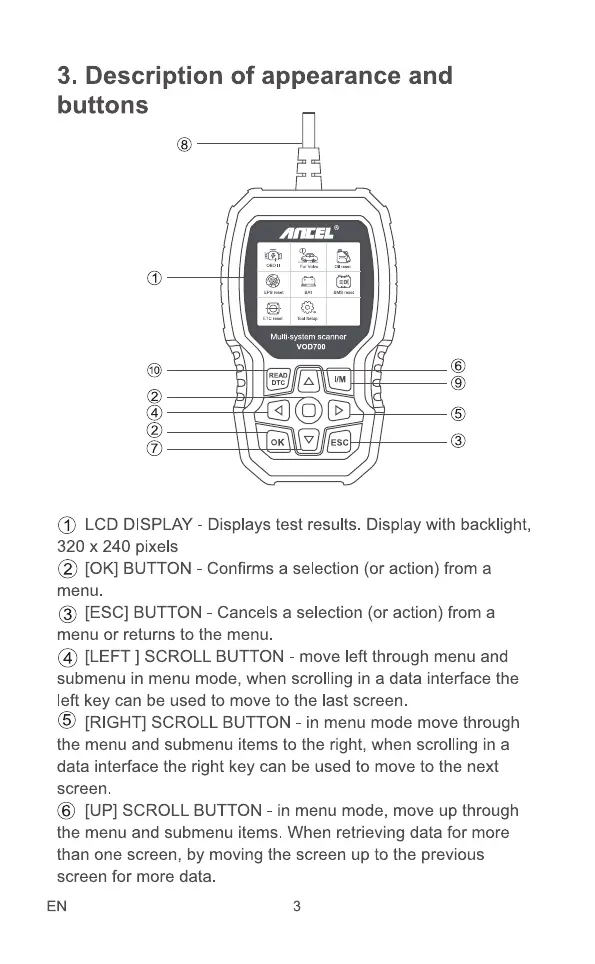
@ LCD DISPLAY - Displays test results. Display with backlight,
320 x 240 pixels
@ [0K] BUTTON- Confirmsa selection(or action)froma
menu.
O [ESC] BUTTON - Cancels a selection (or action) from a
menu or returns to the menu.
@ [LEFT ] SCROLLBUTTON- move left through menu and
submenu in menu mode, when scrolling in a data interface the
left key can be used to move to the last screen.
6 [RIGHT]SCROLLBUTTON- in menumodemovethrough
the menu and submenu items to the right, when scrolling in a
data interface the right key can be used to move to the next
screen.
0 [UP] SCROLL BUTTON - in menu mode, move up through
the menu and submenu items. When retrieving data for more
than one screen, by moving the screen up to the previous
screen for more data.
EN 3


 To Next Page