@ [DOWN]SCROLLBUTTON- inmenumode,usingthemenu
and submenu items to move down. If retrieving data for more
than one screen, move down the screen to the next screen for
more data.
@ OBD-16PlN CONNECTOR - Connects the scan tool to the
vehicle's Data Link Connector (DLC)
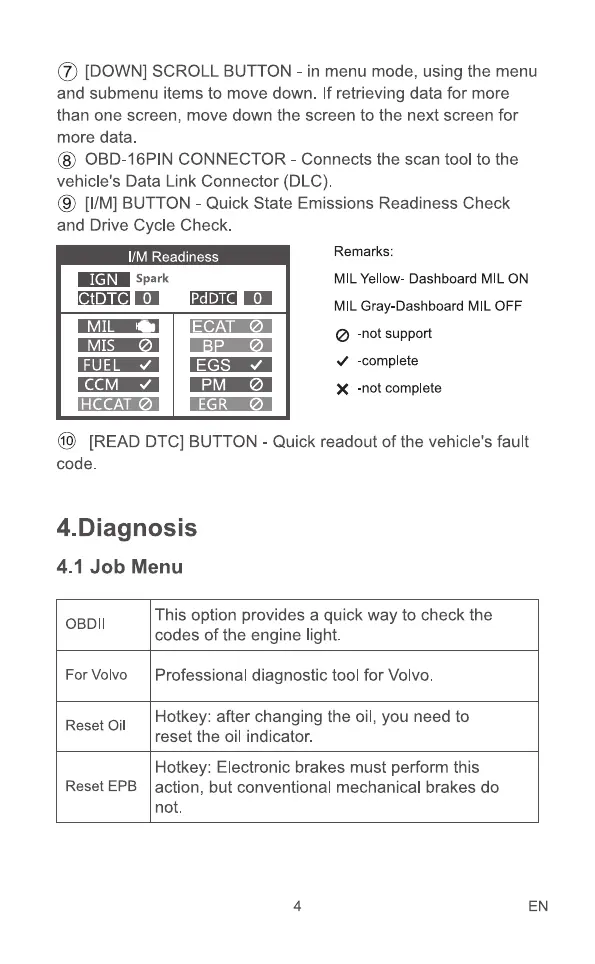
@ [11M]BUTTON - Quick State Emissions Readiness Check
and Drive Cycle Check.
I/M Readiness
Spark
IGN
CtDTC O
MIL
MIS
CCM
HCCAT
PdDTC
ECAT
EGS
PM
EGR
Remarks:
MIL Yellow- Dashboard MIL ON
MIL Gray Dashboard MIL OFF
Ø -not support
-complete
X -not complete
@ [READ DTC] BUTTON- Quick readout of the vehicle's fault
code.
4.Diagnosis
4.1 Job Menu
OBDII
For Volvo
Reset Oil
Reset
This option provides a quick way to check the
codes of the engine light.
Professional diagnostic tool for Volvo.
Hotkey: after changing the oil, you need to
reset the oil indicator.
Hotkey: Electronic brakes must perform this
action, but conventional mechanical brakes do
not.
4 EN


 To Next Page