English 6
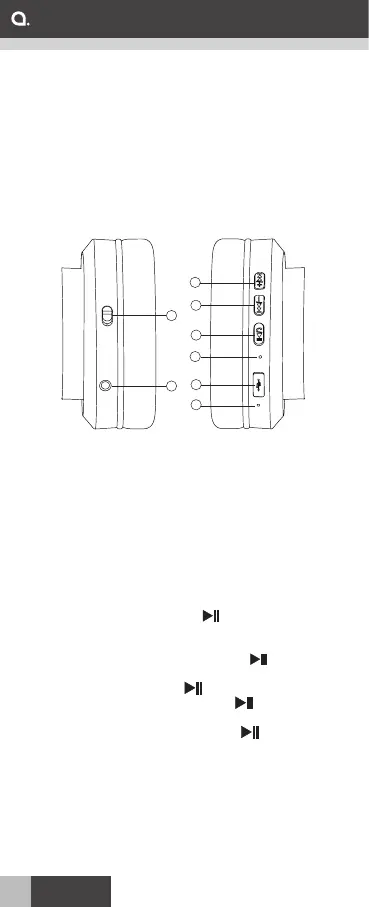
Product:
1. ANC Switch
2. 3.5 mm input
3. Increase volume / forward
4. Decrease volume / backward
5. Multifunction button
6. Status LED
7. Charging input
8. Microphone
The function buttons:
´ Power on/off: To turn on headphone, press
and hold the Bluetooth button until the Status
LED blinks blue. Press and hold the Bluetooth
button again until the Status LED blinks red, the
headphone is turned off.
´ ANC on/off: To start the noise cancellation, slide
the ANC button up to turn on ANC, the ANC
LED (nearby the ANC button) will light up. Slide
the NC button down to turn off ANC.
´ Answer a call: Press the button when
receiving a call. Playback of music will be paused
when receiving and answering a call.
´ Decline a call: Press and hold the button
when receiving a call.
´ End a call: Press the button during a call.
´ Redial a call: Double press the button to
redial the last called number.
´ Play/pause playback: Press the button
during playback of music to pause. Press again
to resume the playback.
´ Adjust playback volume: Press - / + buttons.
´ Forward playback: Press and hold + button.
´ Backward playback: Press and hold - button.
Overview
1
2
3
4
5
6
7
8
ANC


 To Next Page