7English
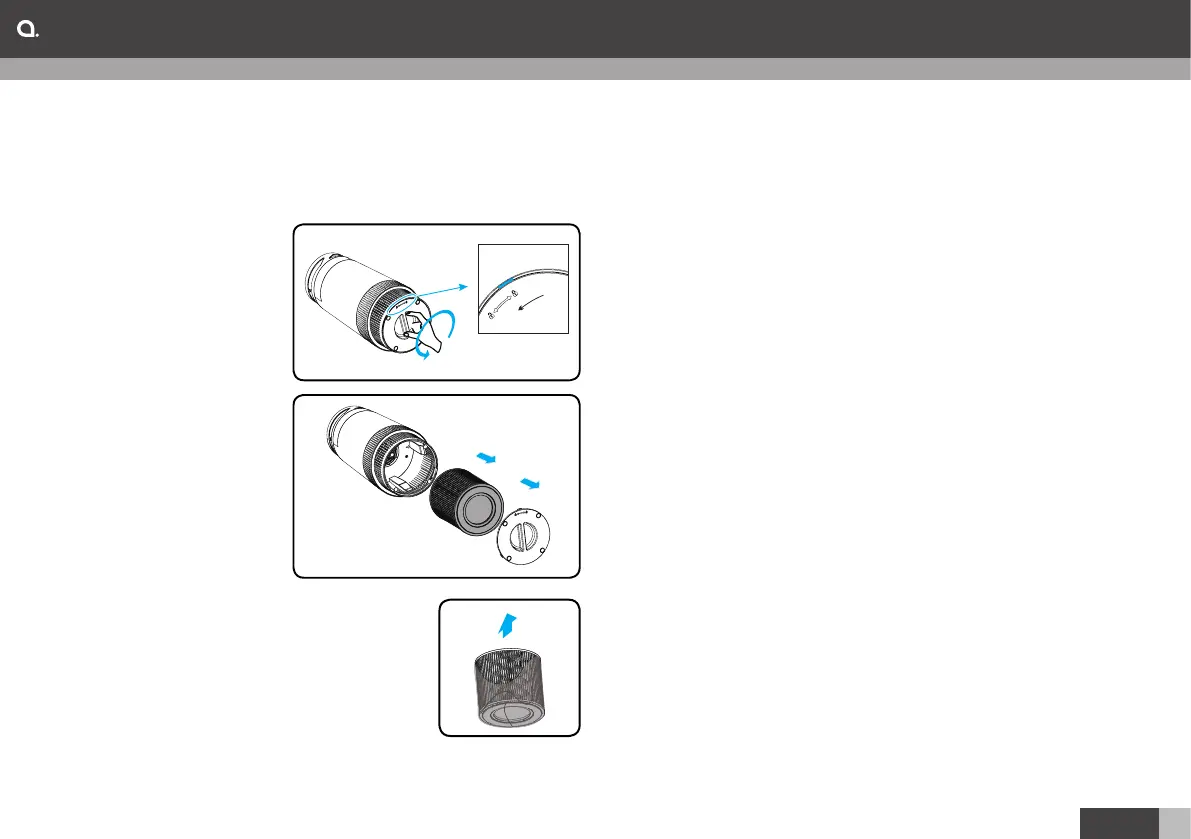
Before first use:
´ The appliance comes with a packed combination filter
inside, remove the filter package as described below.
1. Put the appliance upside down on a soft cloth to avoid
scratching, to open
the base cover,
turn the base cover
anticlockwise from
LOCK to OPEN
position, then the lock
released.
2. Remove the base
cover and take out the
combination filters.
3. Remove the packaging
material from the filter.
4. Put the filter back into
the appliance.
5. Turn the base cover
clockwise from OPEN
position to LOCK position, you will hear
a “click” sound, the base cover is fasten.
Get started:
1. Connect the plug to the wall socket.
All lights trun on once and you hear a beep, then the
lights turn out again.
2. Press the power button to switch on the appliance.
The power indicator and fan speed indicator on the
control panel light up.
3. Fan speed adjustment.
Press speed button to adjust fan speed level. The one,
two and three speed indicators light up means low,
medium and high.
4. Night Light
´ Turn on the air purifier,the colorful light will be turned on.
´ Press the Night Light button once to dim the night light.
´ Press the Night Light button once more to turn off the
night light.
´ Turn off the air purifier and press the night light button
once to turn on the dim night light.
5. Night Mode
When you use the purifier in Sleep mode, it operates very
quietly. Press Night mode button to activate the sleep
mode, Press Night mode button again to switch off sleep
mode.
6. Anion mode
When the appliance is switched on, press anion button
to start anion mode, the appliance will release millions of
anions per second to make the air fresh.
Press Anion button again to switch off anion mode.
Operation



 To Next Page