English 12
Operation
Get started:
1. Draw out the basket, load the dishes and push them
back.
2. Make sure the rinse-aid and detergent is enough for wash
ing cycle.
3. Insert the plug into the socket. Make sure the water
supply is turned on to full pressure.
4. Close the door, press the power button to switch on the
machine.
5. Choose a program, the response light will turn on. Then
press the Start/pause button, the dishwasher will start its
cycle.
6. If you want to delay the washing process, press the
button to add or decrease the delay time, maximum 24
hours delay can be defined. The delay time will be shown
in the LED screen.
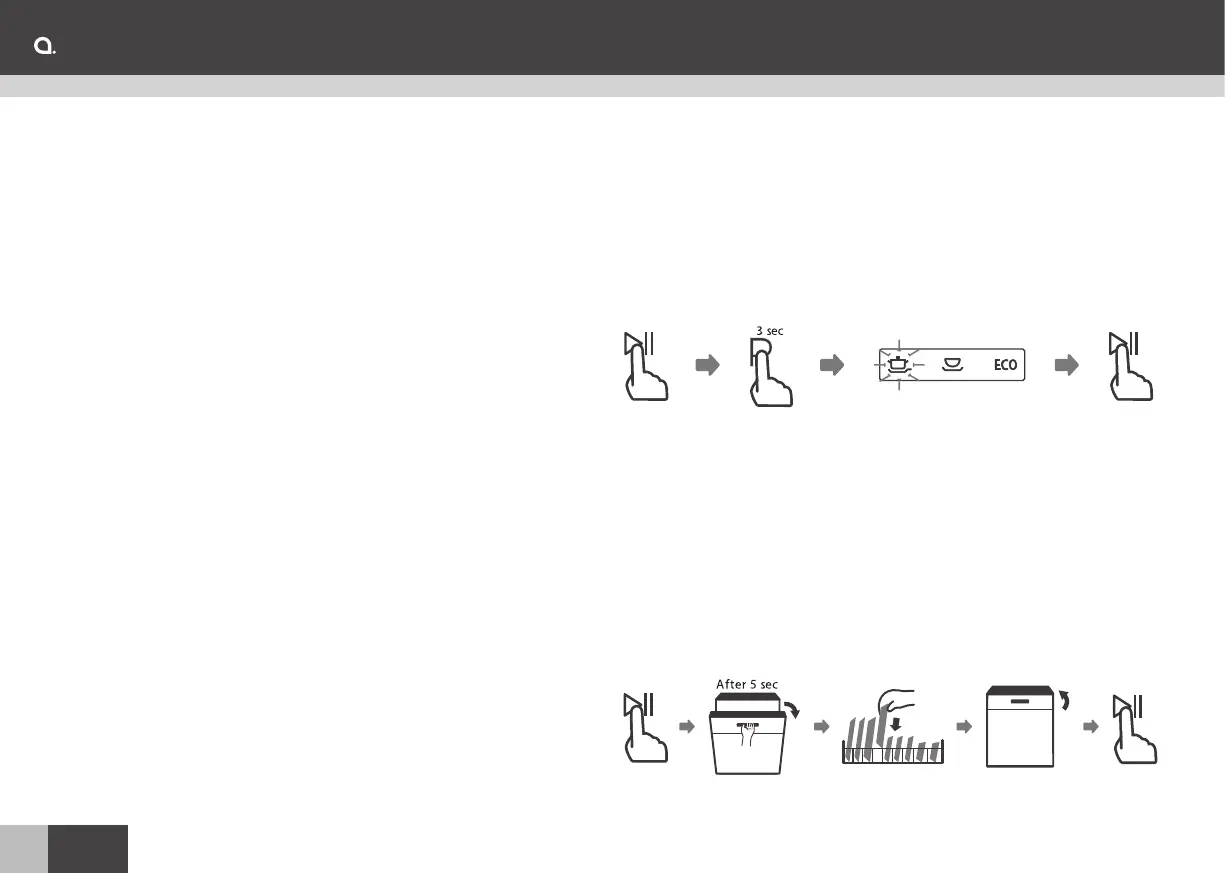
Changing The Program Mid-cycle
1. Press the Start/Pause button to pause the washing.
2. Press Program button for more than 3 seconds - the
program will cancel.
3. Press the Program button to select the desired program.
4. Press the Start/Pause button, after 10 seconds, the
dishwasher will start.
Add a dish during washing
1. Press the Start/Pause button to pause the washing.
2. Wait 5 seconds then open the door.
3. Add the forgotten dishes.
4. Close the door.
5. Press the Start/Pause button after 10 seconds, the
dishwasher will start.
Warning: It is dangerous to open the door mid-cycle, as
hot steam may scald you.


 To Next Page