7
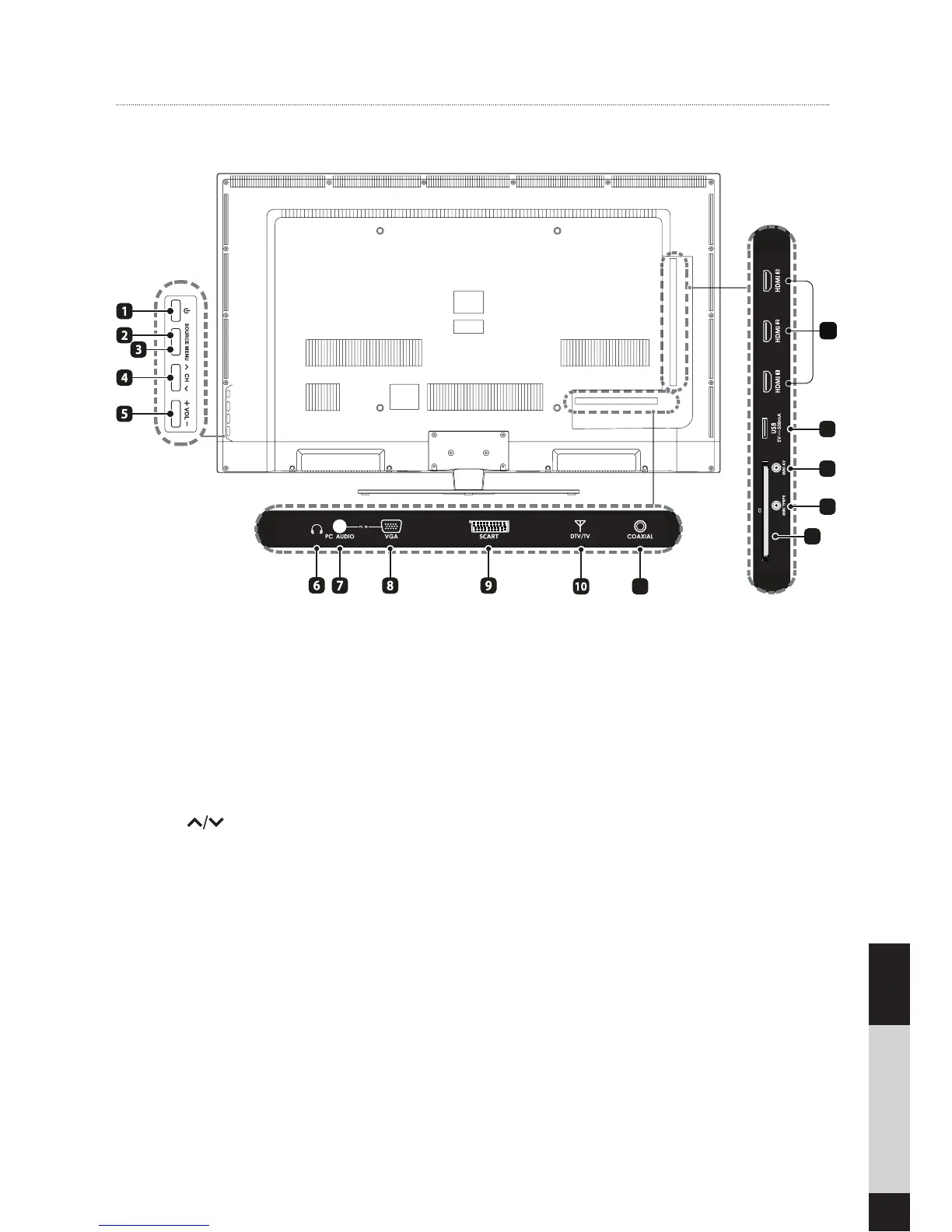
Rear View
1. POWER
Switch the TV between On/Standby
mode.
2. SOURCE
Press to select among different input
signal sources
3. MENU
Display the OSD (on screen display)
menu.
4. CH
Press to select a channel.
5. VOL +/-
Press to adjust the volume.
6. Headphone Socket
Plug in headphones.
7. PC AUDIO Input
Connect to a computer audio output.
8. VGA Input
Connect to a computer or other devic-
es with a VGA interface.
9. SCART socket
You can connect your TV to devices
with a SCART output such as a set
top box.
10. DTV/TV Input
Connect to the antenna (75Ω VHF/
UHF) socket with the RF coaxial cable
11. COAXIAL Digital Audio Output
Connect to the audio socket on the
digital audio system.
12. Common interface slot
Your TV is equipped with a common
interface slot that allows you to insert
a subscription card (to be purchased
separately) to view pay to view ser-
vices.
13. MINI YPBPR
Connect to AV devices with Compo-
nent /AV output sockets.
14. MINI AV
Connect to the composite VIDEO and
AUDIO (L/R) output sockets on exter-
nal video devices.
15. USB port
Connect to USB-devices
16. HDMI Inputs
Connect to a High-Definition (HD)
signal output device.
Preparation
13 14 15
16
11
12


 To Next Page