English Svenska Norsk
9
Preparation
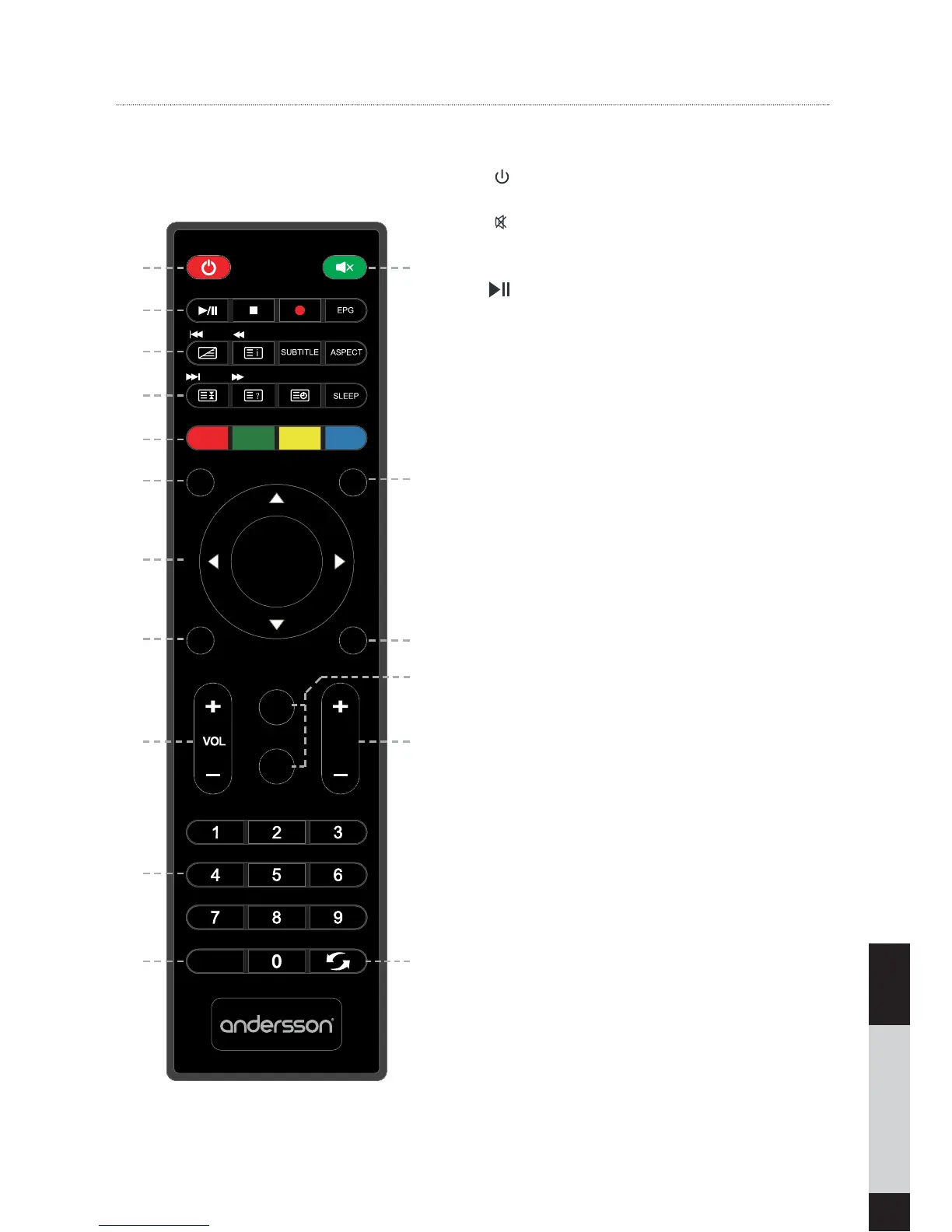
Understanding the remote control buttons
1.
: Switch the TV between on and standby
mode.
2.
: Mute and restore your TV sound.
3. TIMESHIFT: Turn on and off the Time shift
function (DTV mode):
: Press to start playback or pause (USB
Mode).
: Press to stop playback (USB mode).
FAV: Display the Favourite Channel list (ATV/
DTV mode).
REC /: One button recording function
button. Press it to record the current DTV
video.
EPG: Displays the EPG (Electronic Program
Guide) (DTV mode).
4.
I
: Press to skip to the beginning of the
previous chapter or track (USB mode).
TTX: Turn on and off the teletext function
(A
TV/DTV mode).
:Press to fast rewind (USB mode).
INDEX: Press to select the page number of the
INDEX from teletext (ATV/DTV mode).
SUBTITLE: Display the subtitle which is
broadcast with the program (ATV/DTV
mode). Selects subtitles on the media (USB
mode).
ASPECT Select from the following mode
settings: 16:9/ Zoom1 / Zoom2 / Just
Scan(Only HDMI Mode) / Auto / 4:3
5.
I
: Press to skip to the beginning of the
next chapter or track (USB mode).
HOLD: Freeze a multi-page passage on the
screen in Teletext (ATV/DTV mode).
:Press to advance playback rapidly (USB
mode).
REVEAL Reveal hidden information such as
the answer to a quiz in Teletext (ATV/DTV
mode).
SUBPAGE: Display the subpage on the teletext
screen (ATV/DTV mode).
SLEEP: Set the TV sleep timer
6. RED/GREEN/YELLOW/BLUE: Press the button to
select corresponding function on t
he screen.
TIMESHIFT
FAV
/TTX
/HOLD
/REVEA L
SUBPAGE
SOURCE INFO
MENU
EXIT
P.MODE
S.MODE
CH
TV/RADIO
REC
OK
LIS T
/INDEX
1 2
8
11
14
17
13
3
4
5
6
7
10
9
12
15
16


 To Next Page