12
Control Panel
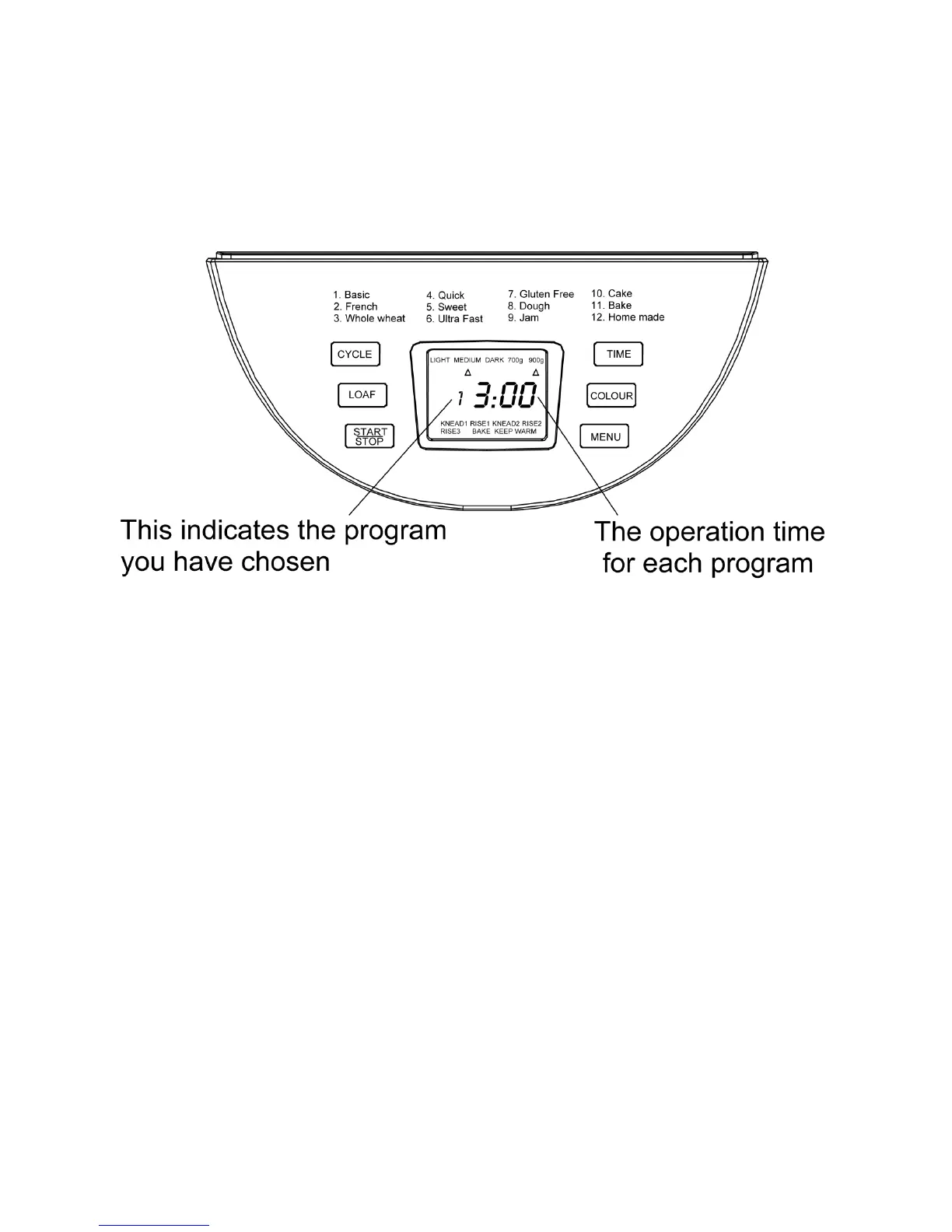
Introducon of control panel.
The silkscreen may be subject to change without prior noce.
Starng the bread maker
As soon as the bread maker is plugged in you will hear a beeping noise. This
indicates that the bread maker is on and ready to use.
“1 3:00” will appear in the display screen.
The two dots in-between “3:00” will not ash constantly.
The back light will shine for approximately 20 seconds.
“1” in the display screen represents the default program seng, this is for
900g of dough at a “medium” default seng.
START/STOP BUTTON
This secon will give instrucons on how to pause, start and stop the
selected program.
To start a program, press the stop/start buon once. A short beep and
the two dots will ash, signalling the program is beginning to start.
All other buons are inacve during a program cycle, apart from the
stop/start buon.
To stop the program press and hold the stop start buon for more than
two seconds, a long beep will then signal the program has iniated the
close down procedure.



 To Next Page