6
Automac start funcon
If you do not wish coee to made immediately, please follow the instrucons below to
delay the start of the operaon.
1. Follow steps 1-5 in “Operang the appliance”.
2. For example if the me is 17:50 and you wish to delay the coee making process
ll 20:15 please follow these set funcons.
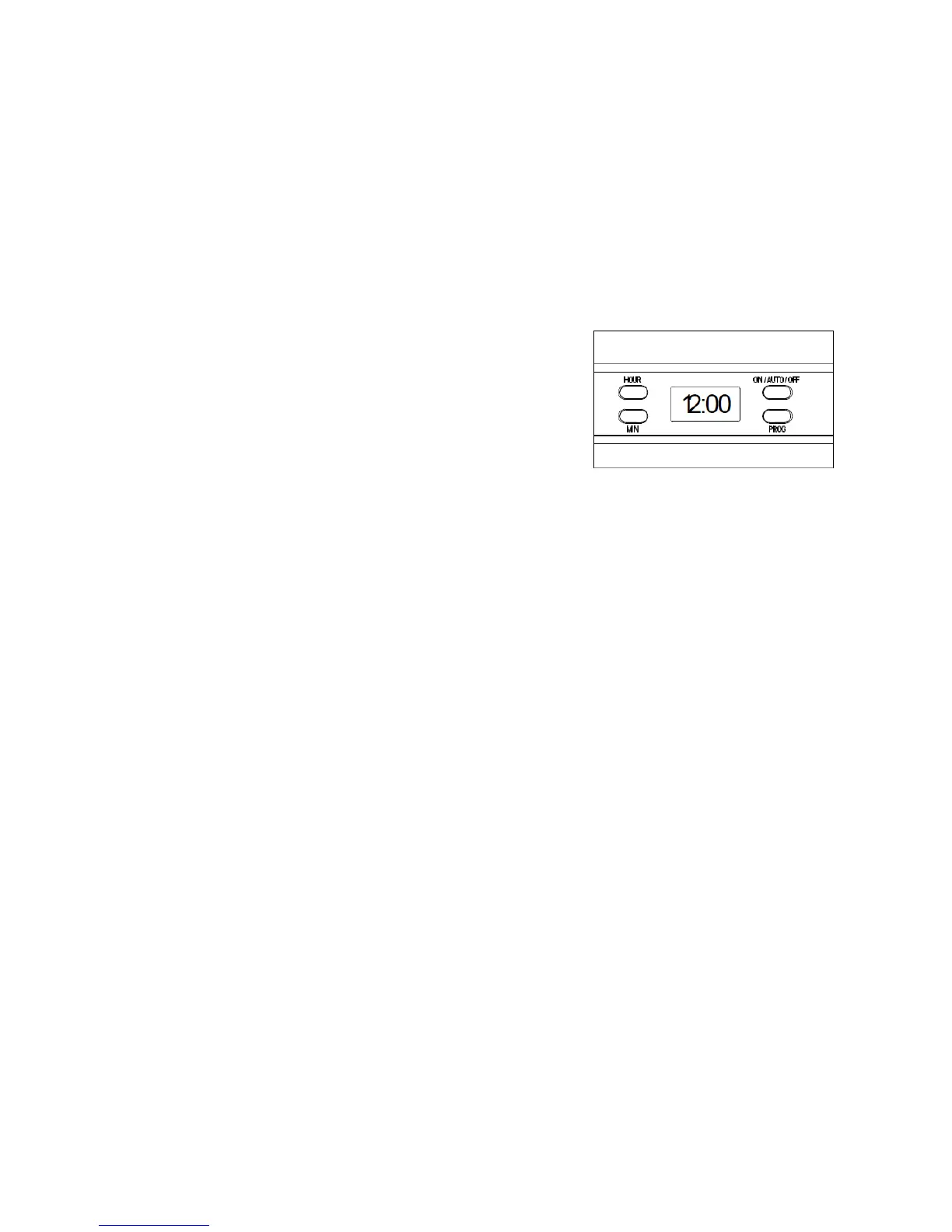
3. Press the “PROG” buon once, the display will now show “CLOCK” in the upper-
right corner of the display.
4. Press the “HOUR” and “MIN” buon connuously to set the present me (real
clock)
5. Press the “PROG” buon once again and the word “TIMER” will show up on the
le corner of the display.
6. Set the delayed starng me by pressing the “HOUR” and “MIN” buon
repevely unl it reaches the required brewing me.
7. Aer seng both of the mes press the “PROG” buon unl the leer of
“CLOCK” and “TIMER” disappears. The blue light in the LCD will illuminate for ten
seconds and then disappear.
8. Press the “ON/AUTO/OFF” buon twice, the indicator in it will now illuminate
blue and ash. The clock will now display the current me. To view the delayed
start me press “PROG”.
9. When the coee machine is ready to start brewing, the “ON/AUTO/OFF” will
stop ashing blue and will turn red. The coee maker will shut o automacally
aer two hours if it is not manually shut o aer brewing.
Note: To cancel the delay funcon press the “ON/AUTO/OFF” buon once. To start
the brewing process immediately press the “ON/AUTO/OFF” buon twice.
Memory
If the power supply is broken or has been unplugged unintenonally during
operaon, once reconnected the appliance will begin operang from the point it was
cut o. The cord however must be replaced within 15 seconds to ensure that this
occurs. If the appliance is unplugged for more than 15 seconds you must start the
appliance operaon again.
5
Control panel
Operang the appliance
1. Press the open lid buon to open the top lid and ll the water tank to in-
between the indicated marks (MIN/MAX) with clean drinking water.
2. Place the funnel into the funnel support, then add a lter into the funnel
support.
3. Add the required amount of coee powder into the lter. It is recommended to
use one measured spoon of coee powder per cup (spoons can be purchased
separately at www.andrewjamesworldwide.com). Close the lid top.
4. Place the carafe onto the hot plate of the appliance.
5. Plug the power cord into the electrical outlet. The LCD will display “12:00” and
the colon will ash. The backlight of the LCD will illuminate once it is plugged in.
6. Press the “ON/AUTO/OFF” buon, the buon will turn red and the appliance
will begin to work.
7. To cancel the brew process at any point press the “ON/AUTO/OFF” buon twice
and the indicator will be illuminated blue and stop ashing, aer ten seconds
the appliance will stop working.
8. Remove the carafe and serve once the brewing process has nished. The coee
machine has a “keep warm funcon” that will last for two hours aer the
brewing process.
Note: You can remove the carafe at any point as the coee machine will stop dripping
automacally. But the me cannot exceed 30 seconds.


 To Previous Page