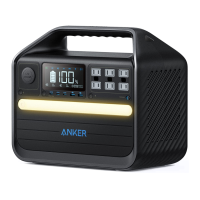
The Anker 555 Portable Power Station (PowerHouse 1024Wh) is a versatile and robust power solution designed for various applications, from outdoor adventures to emergency home backup. It offers a substantial 1024Wh cell capacity, ensuring extended power supply for multiple devices.
Function Description
The Anker 555 Portable Power Station serves as a portable energy hub, capable of charging and powering a wide array of electronic devices and small appliances. It features multiple output ports, including AC, USB-A, USB-C, and a car socket, allowing for simultaneous charging of different devices. The power station can be recharged through various methods: DC input (via a wall outlet), solar panels, USB-C, or a car charging cable, providing flexibility in different environments. It also incorporates a power saving mode to optimize energy consumption and an ambient light for illumination.
Important Technical Specifications
- Cell Capacity: 1024 Wh
- DC Input: 200W Max
- Solar Panel Input: 11-28V⎓10A (200W Max)
- Car Charger Output: 12V⎓10A
- AC Output: 110V 9.09A, 50Hz/60Hz, 1000W Max
- USB-A Output: 5V⎓2.4A (2.4A Max Per Port)
- USB-C Output/Input (100W): 5V⎓3A/9V⎓3A/15V⎓3A/20V⎓3A/20V⎓5A (100W Max)
- USB-C Output (60W): 5V⎓3A/9V⎓3A/15V⎓3A/20V⎓3A (60W Max)
- Discharging Temperature: -4°F-104°F / -20°C-40°C
- Charging Temperature: 32°F-104°F / 0°C-40°C
- Size: 13.8 x 11.6 x 7.4 inches / 350 x 295 x 188 mm
- Net Weight: 13.1 kg / 28.9 lb
- Gross Weight: 16.1 kg / 35.5 lb
Usage Features
Output Ports:
- Car Socket (1): Provides 12V⎓10A output for car-powered devices.
- USB Ports (2): Includes USB-A and USB-C ports for charging various mobile devices.
- AC Output Ports (3): Delivers 110V 9.09A, 50Hz/60Hz, up to 1000W for small appliances.
- DC Input Port (4): Used for recharging the power station via AC adapter, solar panels, or car charger.
Recharging Your Product:
- DC Recharging (200W Max): Connect to a wall outlet using the 200W AC adapter.
- Solar Panel Recharging (200W Max): Connect up to two 100W solar panels in parallel using a solar charging cable and an XT60-DC7909 connector.
- USB-C Recharging (100W): Recharge by connecting to a charger via the USB-C port.
- Car Recharging (120W Max): Connect to a car's output port with the car charging cable.
- Note: When the battery is at 1%, the Remaining Battery indicators will flicker to remind you to recharge.
Powering Your Devices:
- AC Charging: Press the AC button and connect devices to the AC output ports.
- USB Charging: Connect devices directly to the USB ports.
- Car Socket Charging: Press the button on the car socket, connect devices, and start charging.
Power Saving Mode:
- Switching On: Prevents power waste by automatically turning off the Power Station once all devices are fully charged.
- Switching Off: Enables stable charging over an extended period, suitable for time-lapse photography or CPAP machines.
Light Features:
- Ambient Light: Press the button once to turn on, press again to turn off.
- SOS Mode: Press and hold the button for 2 seconds to activate SOS mode.
LCD Screen Guide:
The LCD screen provides comprehensive information about the power station's status:
- LCD Screen Button (1): Press to turn on the LCD screen.
- Power Saving Mode (2): Icon indicates if power saving mode is active.
- High-Temperature Alert (3): Appears if the product is too hot; stop use and allow to cool.
- Low-Temperature Alert (4): Appears if the product is too cold; stop use until the icon disappears.
- USB-C Output/Input Port (5): Indicates activity on the USB-C port.
- USB-A Output Port (6): Indicates activity on the USB-A ports.
- Car Charging (7): Icon indicates car charging is active.
- AC Charging and Voltage Frequency (8): Displays AC charging status and allows switching between 50Hz/60Hz by pressing the AC output port on/off button for 2 seconds.
- Remaining Battery (9): Shows the percentage of battery remaining.
- Time to Recharge / Remaining Battery in Hours (10): Estimates the time needed to fully recharge or the remaining operational time.
- Current Input Power (11): Displays the current power input in watts.
- Current Output Power (12): Displays the current power output in watts.
Maintenance Features
Troubleshooting:
- AC Charging Failure: If AC charging is unavailable, connected devices may exceed 1000W. Unplug some devices to resolve.
- Resetting Your Power Station: If the power station is not working correctly, insert a paper clip or pin into the reset hole for 1 second for a factory reset. If issues persist, contact support@anker.com.
FAQ:
- Battery Drain (No Devices Connected): If AC or Car Socket control buttons are on, there will be some no-load power consumption. Turn off these buttons or enable power saving mode when not in use.
- Max AC Output: The AC output ports can deliver a maximum of 1000W.
- Charging While Discharging: Yes, the product supports pass-through charging.
- CPAP Machine Compatibility: Yes, but ensure power saving mode is turned off first.
- Solar Charger Compatibility: Any 11-28V solar charger with a DC7909 connector can charge this product.
Important Safety Instructions:
- Close supervision is necessary when used near children.
- Do not expose to rain or snow.
- Use only manufacturer-recommended attachments.
- Pull the plug, not the cord, when disconnecting.
- Do not exceed output rating to avoid fire or injury.
- Do not use damaged or modified products.
- Do not disassemble; seek qualified service personnel for repairs.
- Avoid fire or high temperatures (above 130°C).
- Unplug from the outlet before servicing to reduce electric shock risk.
- Servicing should be performed by qualified personnel using identical replacement parts.
- Not permitted on aircraft.

 Need help?
 General

 To Next Page