0403
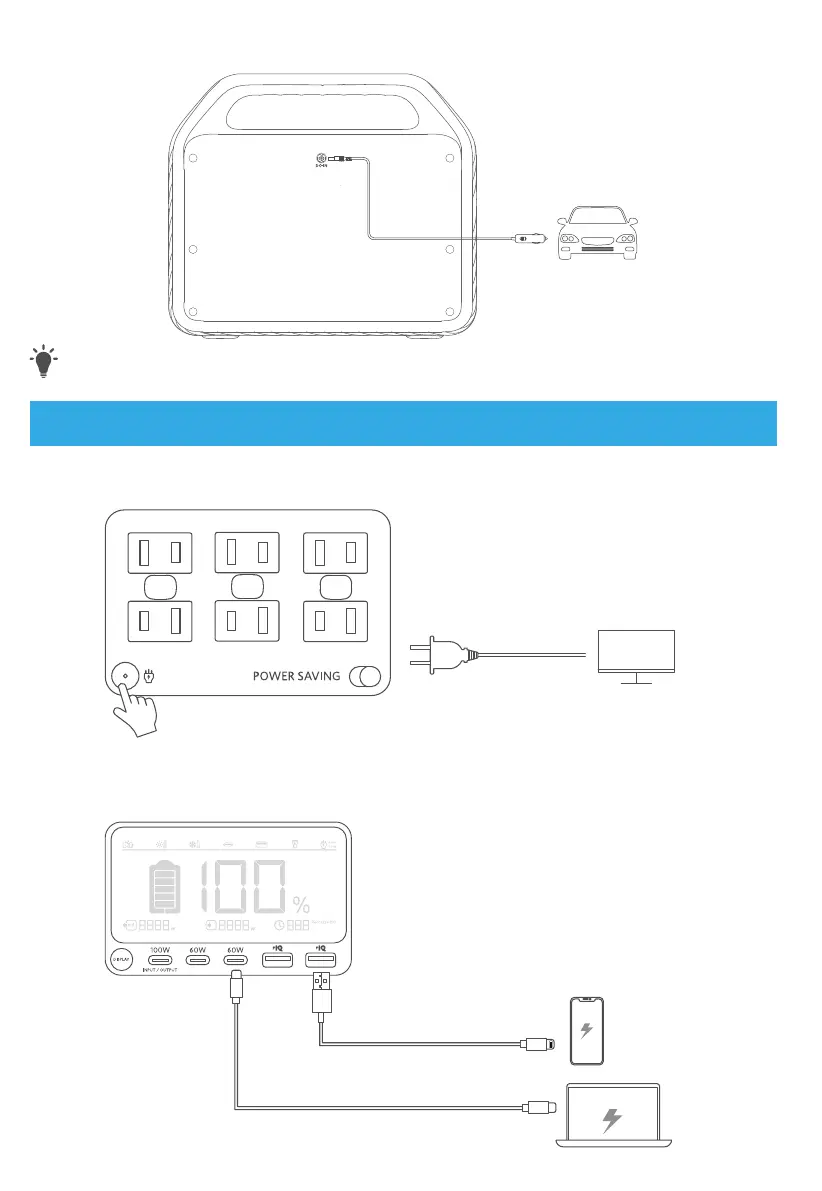
Car recharging (120W Max)
Recharge your Power Station by connecting to a car's output port with the car charging cable.
T
· When your portable power station only has 1% battery remaining, the Remaining Battery indicators will
flicker to remind you to recharge the product.
Powering Your Devices
AC charging
Press the AC button and connect your devices to the AC output ports.
on / o
USB charging
Connect your devices to the USB ports.
Car socket charging
Press the button on the car socket, connect your devices, and start charging.
on / o
Power Saving Mode
Switching on the power saving mode prevents wasting power by automatically turning o the Power Station
once all your devices are fully charged.
Switching o the power saving mode will enable stable charging over an extended period, such as for time-
lapse photography or for sleeping with a CPAP machine.
Light
Ambient light
Press the button once to turn on the ambient light. Press one more time to turn it o.
SOS mode
Press and hold the button for 2 seconds to turn on SOS mode.



 To Next Page