
 Need help?
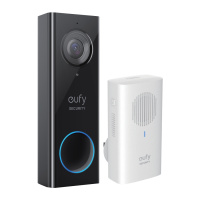
Do you have a question about the Anker eufy SECURITY T8200 and is the answer not in the manual?
Lists all components included with the Video Doorbell 2K (Wired).
Explains how the video doorbell and chime system operate together.
Details the necessary tools and items for installing the doorbell.
Guides on downloading and setting up the EufySecurity mobile application.
Step-by-step instructions for mounting and wiring the video doorbell.
Instructions for restoring power and connecting the doorbell to your home Wi-Fi.
Guides on installing and pairing the electronic doorbell chime.
Explains the thermal conductive pads on the mounting bracket.
Instructions on how to remove the doorbell from its mounting bracket.
Provides information on the limited warranty period.
Offers phone and email contact details for customer assistance.
 General
| Model Number | T8200 |
|---|---|
| Brand | Anker |
| Category | Accessories |
| Type | Video Doorbell |
| Connectivity | Wireless |
| Wireless Protocol | Wi-Fi |
| Power Source | Battery |
| Battery Life | Up to 180 days |
| Volume Control | Yes |
| Camera Resolution | 1080p |
| Field of View | 160° |
| Night Vision | Yes |
| Two-Way Audio | Yes |
| Battery Life (Camera) | Up to 180 days |
| Storage | Cloud Storage |


 To Next Page