EasyManua.ls Logo

Anker 778 - User Manual

Anker 778
30 pages
Print Icon
To Next Page IconTo Next Page
Loading...
Product Number: A83A9 51005003598 V01
For FAQs and more information, please visit:
anker.com/support
@Anker Deutschland
@Anker Japan
@Anker
@AnkerOcial
@Anker_JP
@anker_ocial
@anker_jp
USER MANUAL
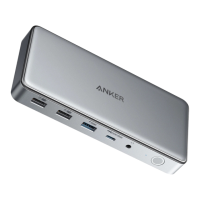
Anker 778 Thunderbolt Docking Station
(12-in-1, Thunderbolt 4)
7
SERIES
Question and Answer IconNeed help?

Do you have a question about the Anker 778 and is the answer not in the manual?

Summary

At a Glance

Host Device USB-C Port Requirements

Host devices' USB-C ports must support Power Delivery and DisplayPort Alt Mode.

Important Safety Instructions

Using Your Thunderbolt Docking Station

Power on Your Dock

Connect the power adapter to the DC-IN port and a power outlet, then press the power button.

FCC Statement

IC Statement

Declaration of Conformity

GB Declaration of Conformity

Customer Service

Lifetime Technical Support

Summary

At a Glance

Host Device USB-C Port Requirements

Host devices' USB-C ports must support Power Delivery and DisplayPort Alt Mode.

Important Safety Instructions

Using Your Thunderbolt Docking Station

Power on Your Dock

Connect the power adapter to the DC-IN port and a power outlet, then press the power button.

FCC Statement

IC Statement

Declaration of Conformity

GB Declaration of Conformity

Customer Service

Lifetime Technical Support

Anker 778 Specifications

General IconGeneral
ModelAnker 778 Thunderbolt Docking Station
Video OutputSingle Monitor: 8K@30Hz via Thunderbolt 4
Data Transfer Speed40Gbps (Thunderbolt 4)
CompatibilityThunderbolt 4/3 compatible devices, Windows, macOS
Ports2 x Thunderbolt 4, 3 x USB-A, 1 x HDMI, 1 x Ethernet, 1 x 3.5mm Audio

Related product manuals