EN
12
Settings
Go through the setup process when you power on Nebula Astro for the rst time.
Determine the distance range to trigger Eye Guard, set your name, birthday, and
password.
1.
Network
This projector can be connected to the Internet via a wireless (Wi-Fi) connection.
①
Select to access the Settings page. Select [Network] and press
.
②
Follow the on-screen instructions to complete the network connection.
2.
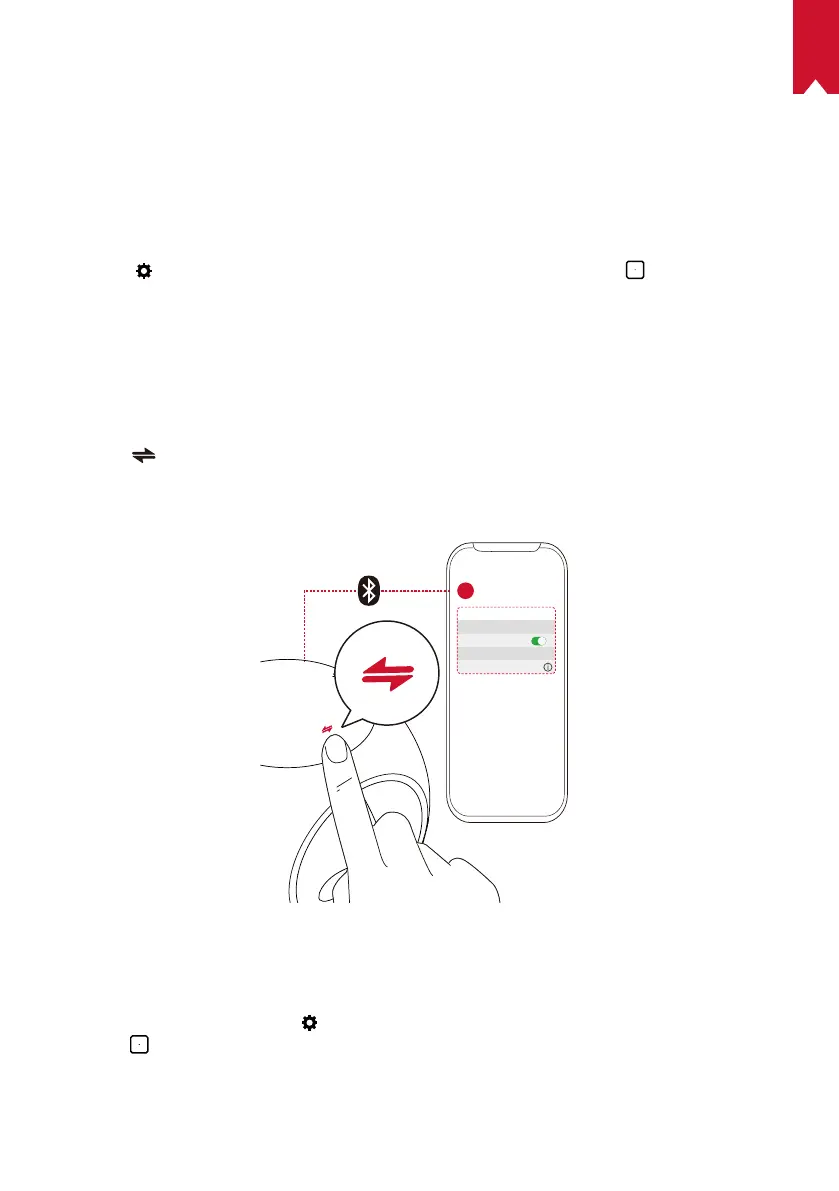
Bluetooth
Bluetooth Speaker Mode
You can use this projector as a standalone Bluetooth speaker.
①
Press to switch to Bluetooth speaker mode.
②
Enable Bluetooth on your smartphone and select [Nebula-XXXXXX] as the device to
be connected.
< Settings Bluetooth
Nebula-xxxxxx
Bluetooth
Connected
DEVICE
2
1
Projector Mode
You can connect a Bluetooth speaker or pair of headphones to Nebula Astro while in
projector mode.
①
On the home menu, select to access the Settings page. Select [Bluetooth] and
press
. Enter the password if needed.
②
Follow the on-screen instructions to complete the Bluetooth connection.



 To Next Page