05
04
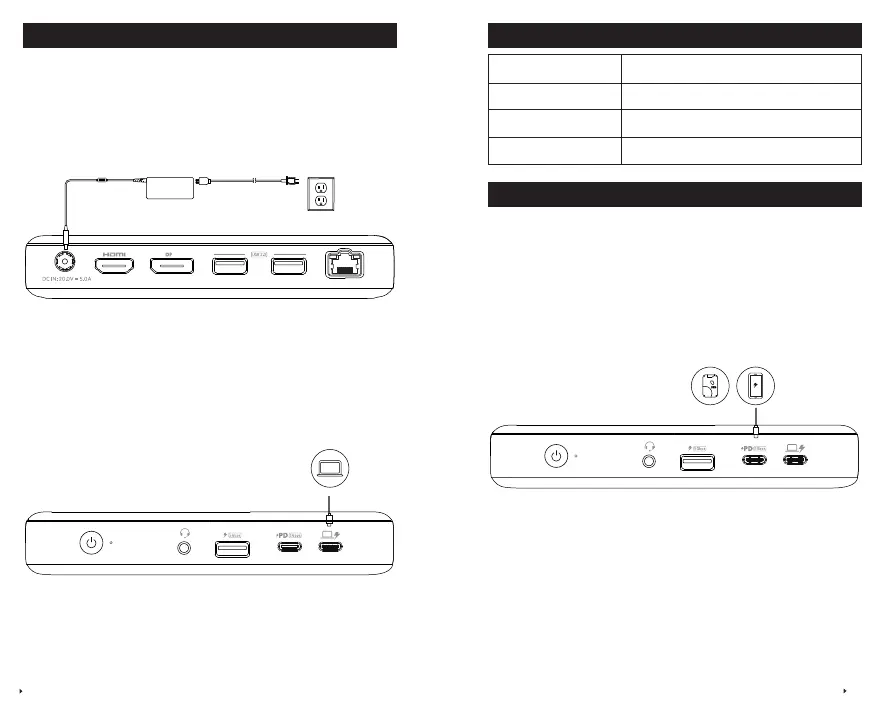
LED Indicator Guide
LED indicator Description
Solid green Powered on
Solid blue
Connected to your laptop
O
Powered o
Port Overview
USB-C 3.1 Gen 1 Port
Can be connected to USB-C compatible devices, such as an SSD (solid-state
drive) or other USB storage device to provide data transfer speeds of up to 5
Gbps. Also compatible with Power Delivery 3.0 20W to charge your phone or
tablet.
Using Your USB-C Dock
Power on Your Dock
1.Plug one end of the included power adapter into the DC-IN port and the
other into a power outlet.
2.Press the power button. The LED will turn green.
Connect the Dock to Your Laptop
Connect your laptop to the dock’s USB-C upstream port using the provided
cable to access pass-through charging for laptops at a maximum output of
60W.
Laptop


 To Next Page