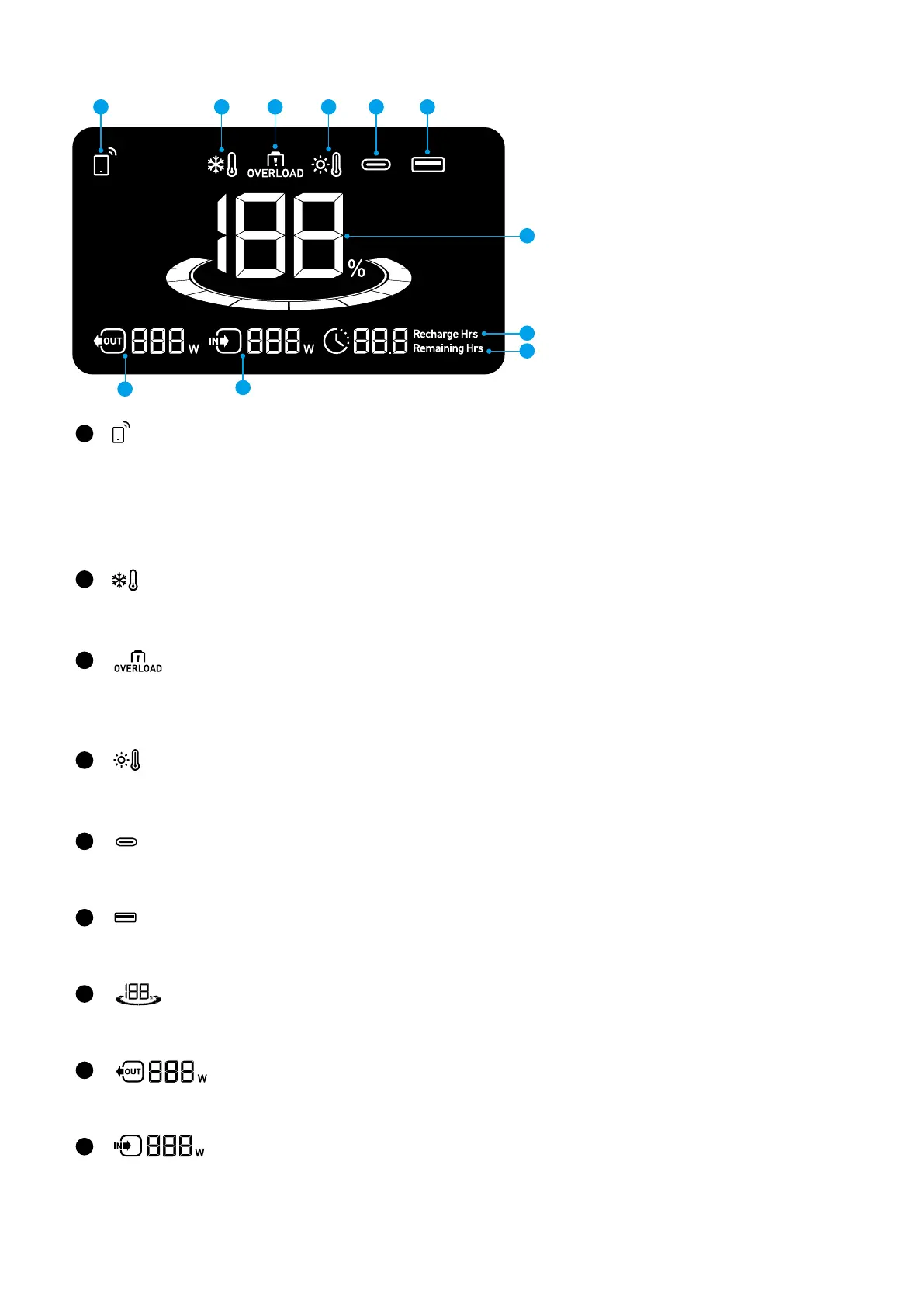
LCD Screen Guide
1
3
2
5
6
7
10
11
4
9
8
1
IoT:
Press the IoT button once to turn on Bluetooth and Wi-Fi, and connect your devices via the app when this icon appears
on the screen.
Press the IoT button for 2 seconds to turn o Bluetooth and Wi-Fi.
Press the IoT button for 7 seconds to reset Bluetooth and Wi-Fi.
2
Low-Temperature Alert:
When this icon shows, stop using the power station until the icon disappears.
3
Overload Warning:
This icon appears when a port is overloaded. The port will be turned o to avoid any damage. Please remove the device
causing overload.
4
High-Temperature Alert:
When this icon shows, stop using the power station and let it cool down until the icon disappears.
5
USB-C Input/Output Port
6
USB-A Output Port
7
Remaining Battery for Power Station
8
Current Output Power
9
Current Input Power



 To Next Page