EN
07
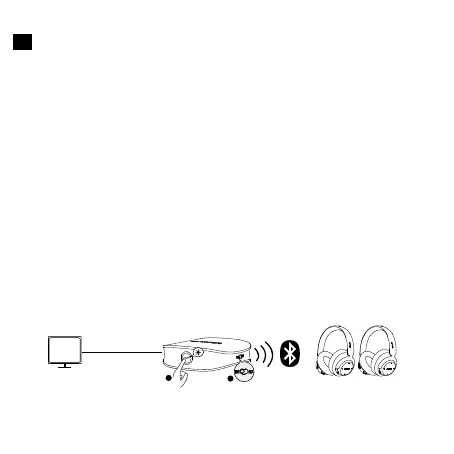
Connect to two Bluetooth headphones/speakers at a time
• This function is only available in TX mode.
• You can play music on two headphones/speakers at a time.
1. Pair your Soundsync with the first Bluetooth headphone/speaker via
Bluetooth. Once successfully connected, turn o both your Soundsync
and the first Bleutooth headphone/speaker.
2. Turn on the Bluetooth on your second headphone/speaker. Press
and hold the multi-function button for 2 seconds or press twice to enter
Bluetooth pairing mode.
3. Place your Soundsync next to the second headphone/speaker and wait
for 30 seconds for connection. Once successfully connected, turn o your
Soundsync.
4. Turn your first headphone/speaker on, then turn on your Soundsync
and wait for another 30 seconds. Both headphones/speakers will have
sound if successfully connected.
• If the connection fails, reboot your Soundsync or repeat the steps
above.
AUX / SPDIF IN
TX Mode
TV
1
2
x 2


 To Next Page