Inserting the Battery
1.
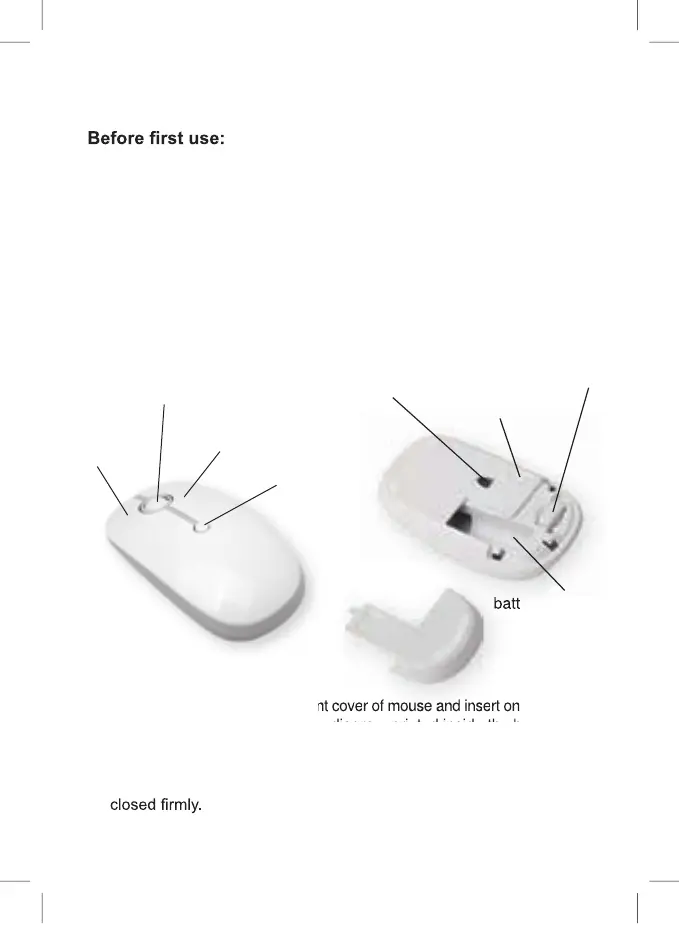
battery. Please note the polarity diagram printed inside the battery
compartment. Caution! Danger of explosion if the batteries are incor-
rectly replaced.
2. Replace the battery compartment cover again, making sure it is
Remove the battery compartment cover of mouse and insert one 1.5 V AA
3
Supports:
Windows XP SP3 / VISTA 7/8/10 and Mac OS X 9.x or later
1. Unpack the device and check if all parts are there and undamaged.
Should this not be the case, return the product to Kmart for replace-
ment.
2. Danger of suffocation! Keep all packaging materials away from
children.
3. Remove all protective foils and packaging material prior to use.
Product overview:
right button
DPI button
left button
scroll wheel
P180203-3_Intra_42710882_20181120.indd 3 20/11/2018 1:30 PM
USB receiver
battery compartment
ON/OFF switch
optical sensor



 To Next Page