3 4
MODE / UNIT TRANSFER
Note: The unit system of scale depends on scale destination or the requirement
of distributor.
WEIGHING
Load
weighing
object
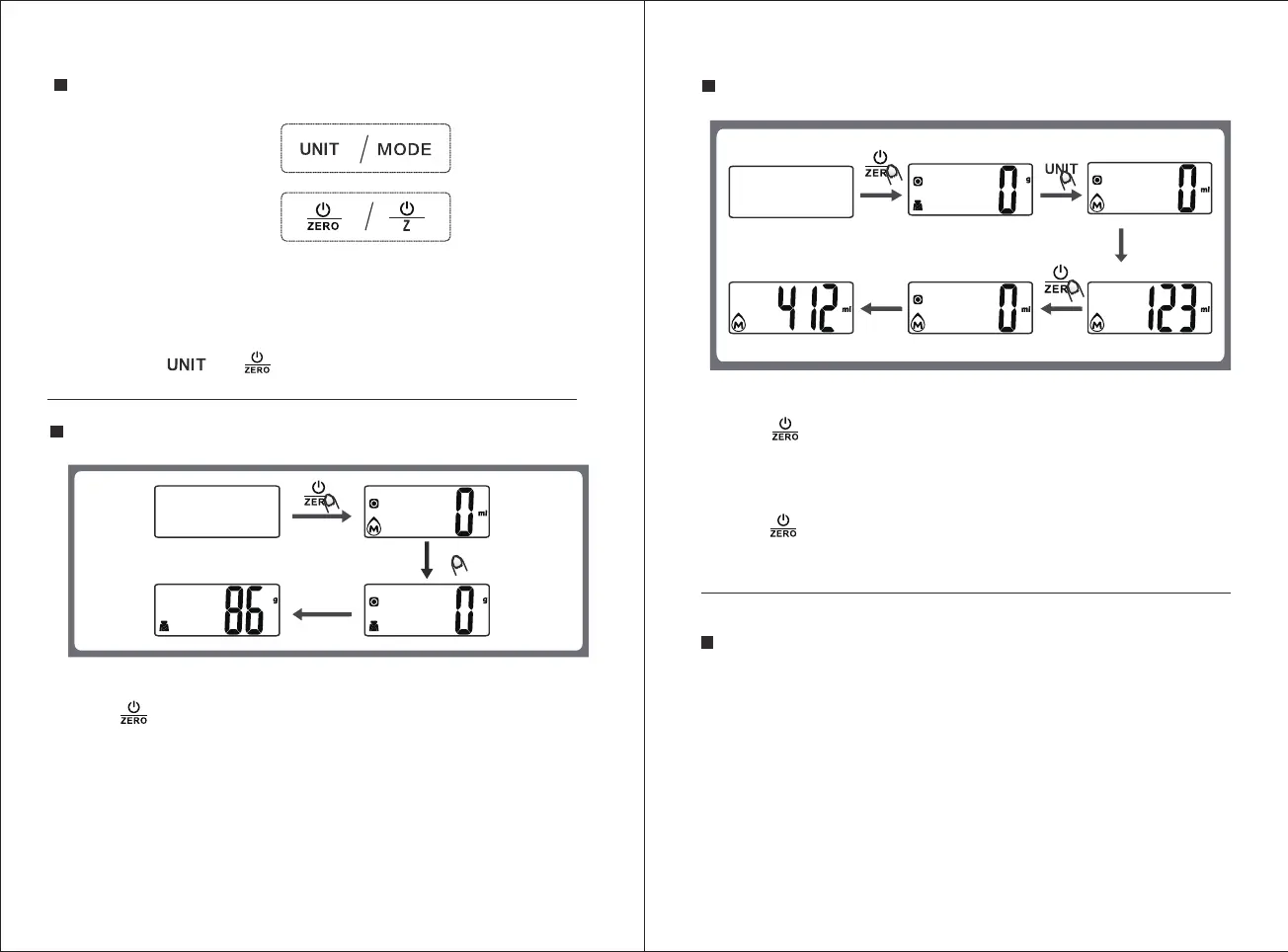
1. Place the scale on a solid and flat surface. Place bowl (if any) on the scale.
2. Press button to turn on the scale.
3. Start weighing when LCD shows "0". Press UNIT button to convert to weighing
mode.
4. Load weighing object on scale(or bowl) to start weighing. LCD will show the weight
reading.
5. If the weighing object is liquid, press the UNIT button to convert the scale to water
or milk volume mode, it will show the volume.
Load weighing
object
VOLUME MEASURING
Pour milk
1. Place the scale on a solid and flat surface.
2. Press button to turn on.
3. Press UNIT button to convert the mode to water or milk volume mode when
LCD shows"0".
4. Put a container onto the scale platform, LCD shows the weight of the container.
5. Press button for Zero or Tare.
6. Pour liquid (water or milk) into the container, LCD shows the volume of the liquid.
1. Above buttons are for indicative only.
2. UNIT button for some items are on bottom of the scale, please set the
unit there if needed.
3. Buttons and are indicative in this manual.
BUTTONS FUNCTION
MODE CHANGING,
UNIT CHANGING
BUTTONS:
ON/OFF, ZERO,
TARE BUTTONS:
Note:
Press UNIT button to switch the mode or unit you need after turning on the
scale, it can be switch cercularly.
There is UNIT button on base of the scale for some models, in this case, you
need to set the unit with the UNIT button on base.
UNIT



 To Next Page