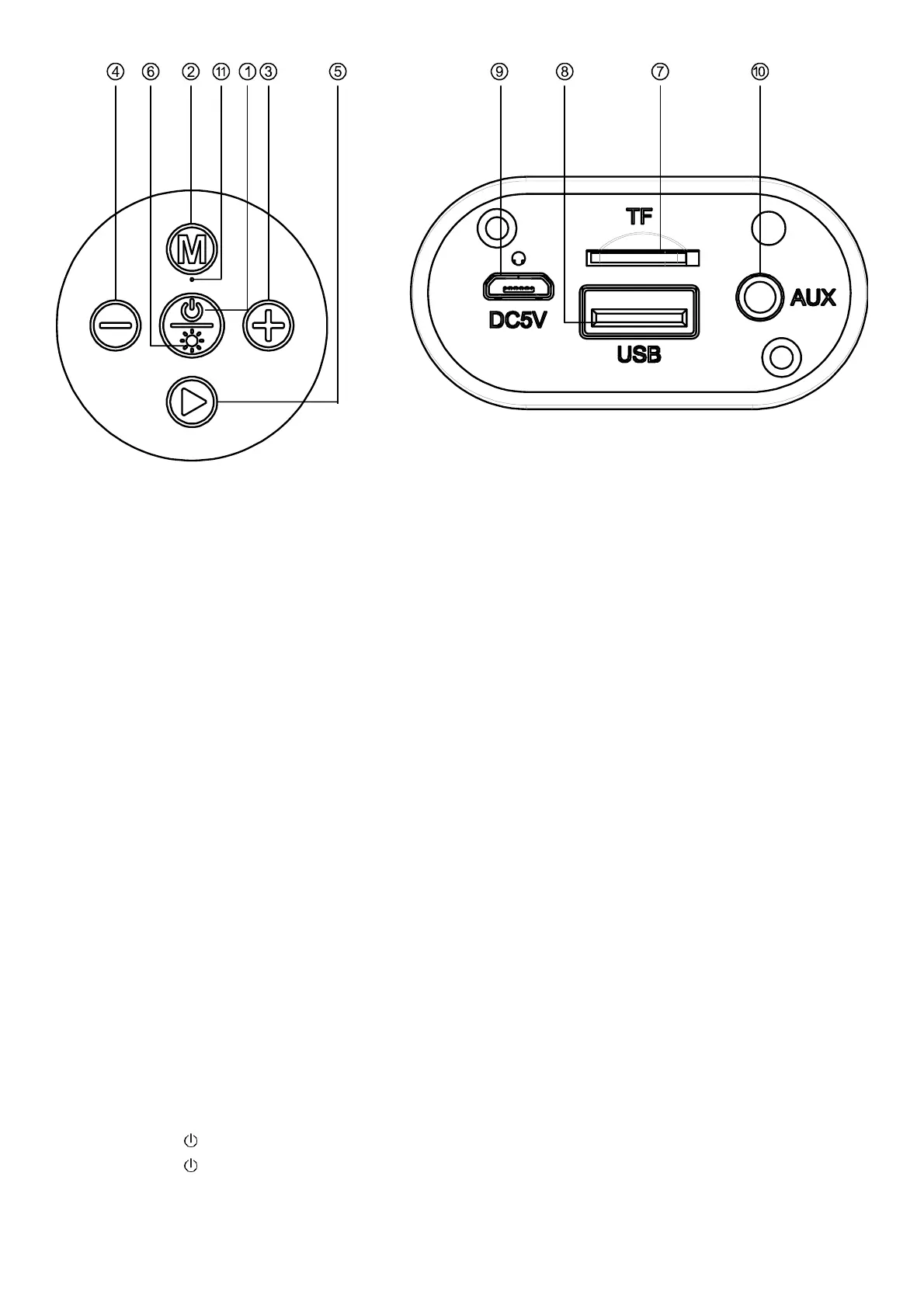
Functionality:
① Power button: turn on/off the unit
② Mode button : can switch function between Bluetooth, Aux, TF mode and USB mode
③ Short press to next song. Long press to Volume+
④ Short press to previous song. Long press to Volume-
⑤ play/pause button
⑥ Led button
⑦ TF Card
⑧ USB port
⑨ Charging port
⑩ 3.5mm audio input line/Auxiliary
⑪ Microphone
Charging:
The speakers are powered via an integrated rechargeable battery. The battery cannot be removed or replaced.
Upon initial use, the battery should be charged fully to ensure optimal performance and battery life.
Charge the device with the included USB charging cable. Plug the micro-USB end of the charging cable into the
DC charging port (9) and the USB-A into a suitable USB port on your computer or a USB wall charger with
DC5V.
The led indicator will turn red while charging. Once fully charged, the red led will turn off. Charging time approx.
4 hours.
Power On/Off
1. Long press 3s to turn the unit on
2. Long press 3s to turn the unit off.
Pairing a Bluetooth device for the first time


 To Next Page