20
Anoa EX / EX+ User Manual Anoa EX / EX+ User Manual
21
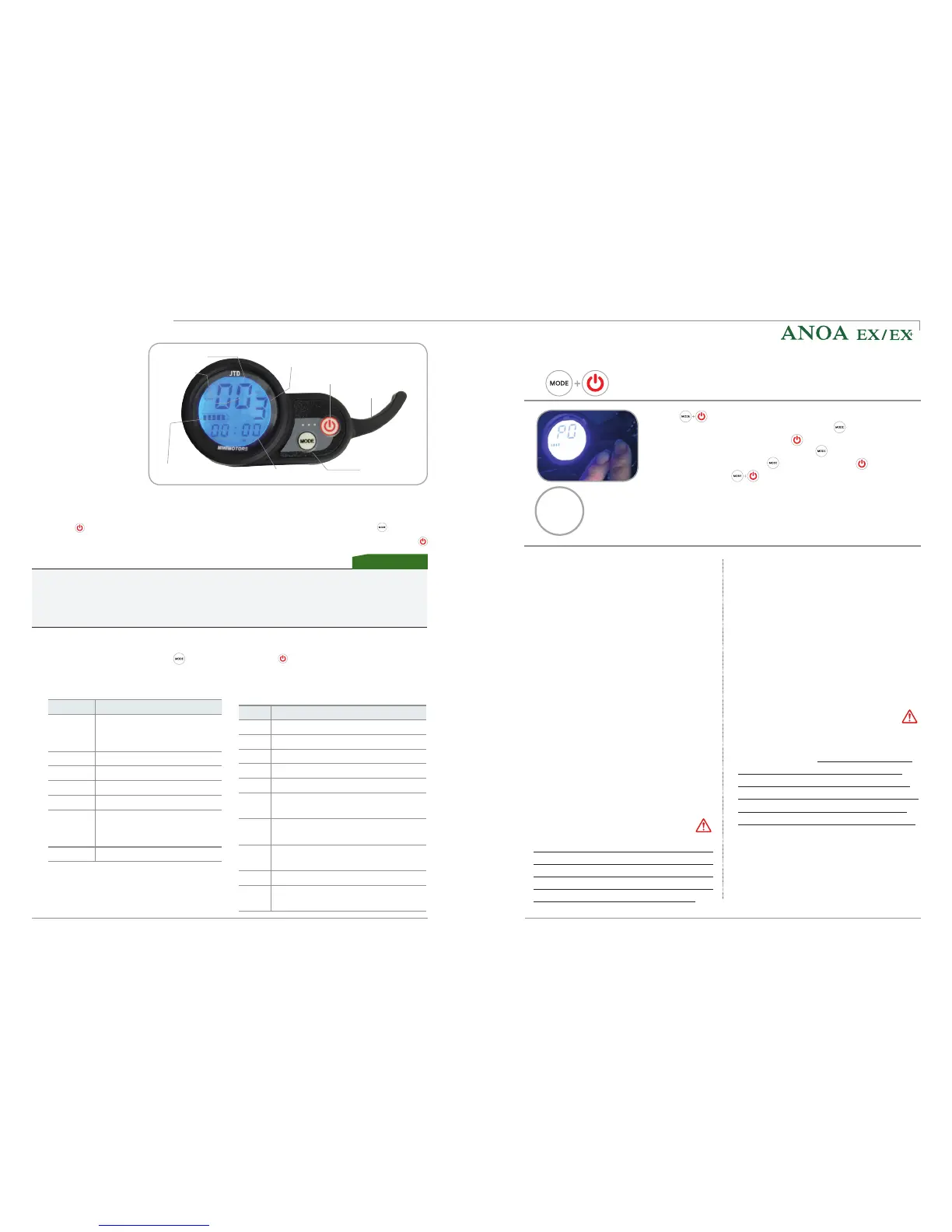
Power button
Battery remaining
Accelerator
Mode button
Speed
Speed unit
Speed mode
Speed mode
8) How to control
the dashboard
Change the speed mode when the dashboard is on. To display the current speed mode,
press . The number for the speed mode will start blinking. Then press multiple
times to set the speed (L1 – low speed, L2 – medium speed, L3 – high speed). Press
to confirm.
(1) Adjusting the speed mode
* Please note, that the slow start setting P7 (start mode) does not work if you selected
speed mode L1.
* When selecting the L3 speed mode (high speed), during full acceleration the speed
displayed on the dashboard may temporarily differ to the actual speed.
Information
Press again to finish all settings and
return to the main screen.
Mode
Display values and settings
P0
9 (unalterable)
P1
43.0 (unalterable)
P2
15 (unalterable)
P3
0 (fixed)
P4
Speed display: Km/h(0), mp/h (1)
P5
Start mode: Accelerator start (0),
start after kicking (1)
P6
Cruising mode (auto riding):
Off(0), on (1)
P7
Start speed: Power start (0), slow
start (1)
P8
Max. speed setting: 1 to 100%
P9
Electric brake power: Off (0),
medium (1), hard (2)
(3)
Returning to the main screen after setting details
(4)
Detail functions
Each time you press the button
briefly, the mode changes to the next
mode.
(2) Mode settings
Mode
Description
TRIP
Current mileage (Press
and hold the mode button
to set "0")
ODO
Total mileage
CHA
Not used
VOL
Current voltage(Volt)
DST
Not used
TIME1
Elapsed time, since
dashboard was switched
on
TIME2
Not used
* Note: The voltage displayed in VOL mode
has about 1V to 2V difference from the
actual batter voltage.
(5)
(6) Features of cruise mode (7) Adjusting the intensity of the
electric brake
Press simultaneously for about 2-3 seconds to enter the
P0 mode (detail function settings) > Press
to move between
P0 mode and P9 mode >Press
to change setting value >
When changing the setting value press
button to change the
setting value. > Press the
to increase and to decrease
the value > Press
simultaneously for about 2-3 seconds
again to confirm all new settings.
P0
09
Ex) P0 default
value setting
The cruise control function allows you to
maintain the riding speed automatically.
This is convenient for the rider for long
distances and has the advantage of
saving battery consumption.
The Anoa EX / EX+ is equipped with a physical
brake for the front and rear wheels, which can
be activated by pulling the physical brake lever
on the handle. Additionally, the electric brake
can be activated in the P9 detail function settings
on the dashboard. If “0” is selected, the electric
brake is off, “1” will assist with medium intensity
and “2” with strong intensity.
* Starting the cruise function
a. Select the cruise mode before riding,
as explained in section (5) above.
b. If the throttle is kept at the same
acceleration for about 7 seconds, the
cruise mode will start automatically.
* Ending the cruise function
When you hold and release the brake
while the cruise mode is running, the
cruise mode is automatically cancelled.
* Precautions when using the cruise function
For your safety, be sure to travel in a
position where the brake can be applied
immediately in order to respond to
any unforeseen incidents.
in order to
respond to any unforeseen incidents.
* The electric brake will not operate,
when the battery is fully charged
Do not use the electric brake immediately
after full charging.
For your safety and to
enhance the lifetime of your battery, it
is recommended that you do not use the
electric brake with a fully charged battery.
Only use the electric brake, when more
than 5% of the battery capacity was used.
Warning
Warning
How to use the product


 To Next Page
 Loading...