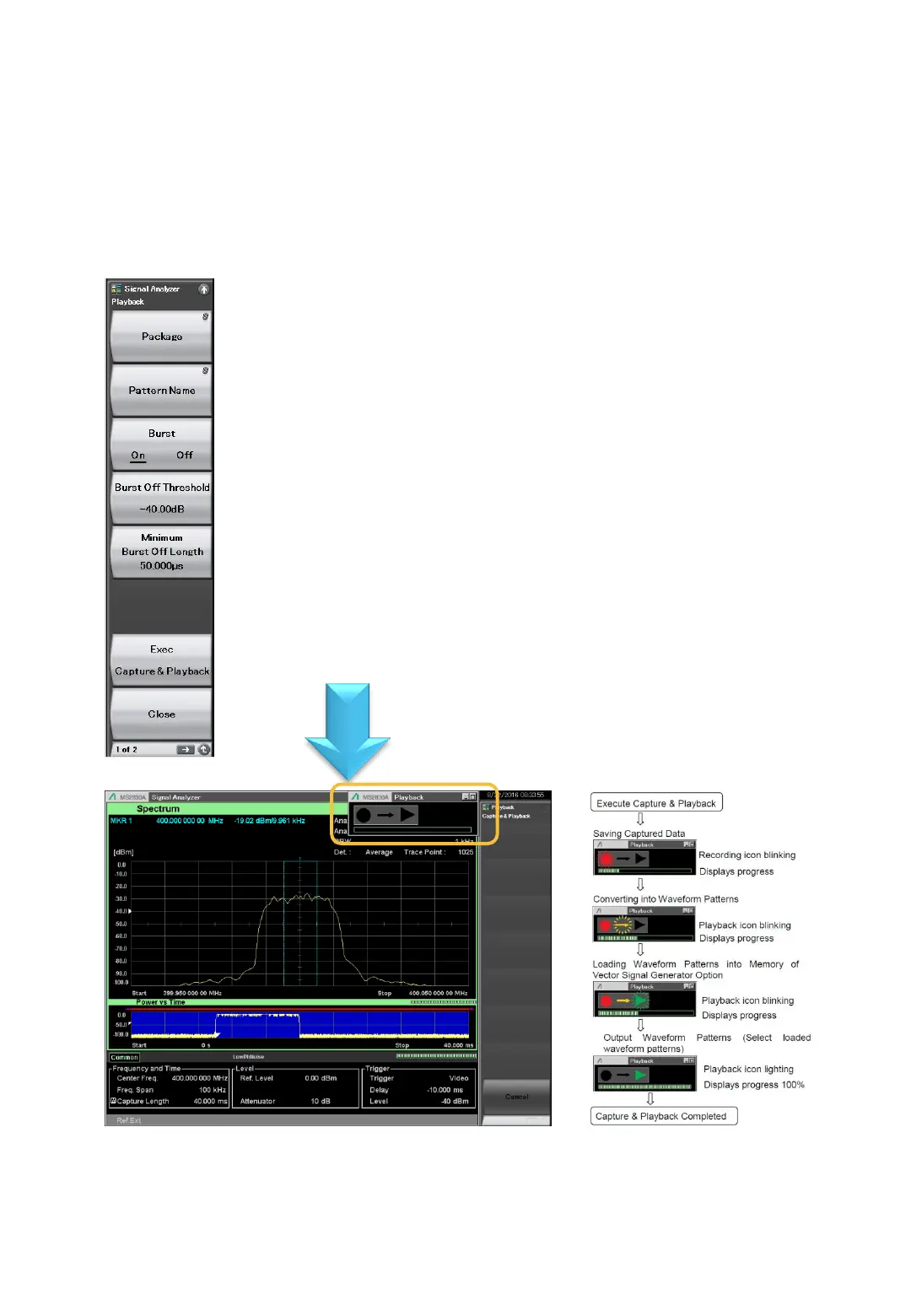
[Capture & Playback]
Case ①: Capturing One Burst Signal Only 2/3
(Continued)
Playing back signal from captured data (Playback)
> [Menu]
> [F7: Capture]
> [F6: Capture & Playback]
> Set the following.
Set waveform pattern package name
*Default: Playback
Set waveform pattern pattern name
*Default: Digitize+YYYMMDD+_addition number; Example: Digitize20160805_004
Set burst signal to On
*Generates waveform pattern as non-signal on Off period.
Set burst signal Off evaluation level
*Can only be set at Burst = On
Set burst signal Off evaluation time
*Can only be set at Burst = On
Execute Capture & Playback
▼ ▼ ▼ Optimum Setting▼ ▼ ▼
▼ ▼ ▼ Execute After Making Above Settings ▼ ▼ ▼
This completes waveform pattern generation.
The following icons are displayed at the top
right of the screen during Capture & Playback
Icon transitions












 To Next Page