[Capture & Playback]
Case ①: Capturing One Burst Signal Only 1/3
This explains capture of only one burst of the target signal by the signal analyzer and playback from
the signal generator.
At playback, the single burst signal is output repeatedly from the signal generator.
This can be used for tests that do not require continuous data, such as evaluation of the adjacent
channel leakage power at tests of transmitter characteristics, and PER* measurements of receiver
characteristics. However, there are some cases where this evaluation cannot be performed due to
signal specifications.
Switching to signal analyzer mode
> [Application Switch]
> [F2: Signal Analyzer] *The application button layout may change arbitrarily.
Executing preset
> [Preset]
> [F1: Preset]
Setting frequency (Example: 400 MHz) *Set to the center frequency of the target signal.
> [Frequency]
> [F1: Center] = [400] [F2: MHz]
Setting span (Example: 100 kHz) *Set to the observed full span of the entire target signal spectrum
> [Span] = [100] [F3: kHz] *This can be set using the Up and Down keys.
Setting sub-trace screen *Power vs Time is displayed at the bottom of the screen.
> [Trace]
> [F8: Sub Trace Setting]
> [F1: Trace Mode]
> [F2: Power vs Time]
Setting capture time (Example: 40 ms)
*Set to burst period of target signal (Example: 40 ms)
> [Menu]
> [F7: Capture]
> [F2: Capture Time Length] = [40] [F2: ms]
Adjusting reference level
> [Amplitude]
> [F1: Reference Level]
= Adjust so that the “Level Over” warning dialog is not displayed.
*This can be set using the Up and Down keys.
*Aim to set so there is about one scale of empty space above the spectrum.
Setting trigger
> [Trigger/Gate]
> [F1: Trigger Switch] = On
> [F4: Trigger Level (Video)] = Best Adjustment
> [F8: Trigger Delay] = [-10] [F2: ms]
Setting single sweep (Single)
> []
*This completes signal capture.
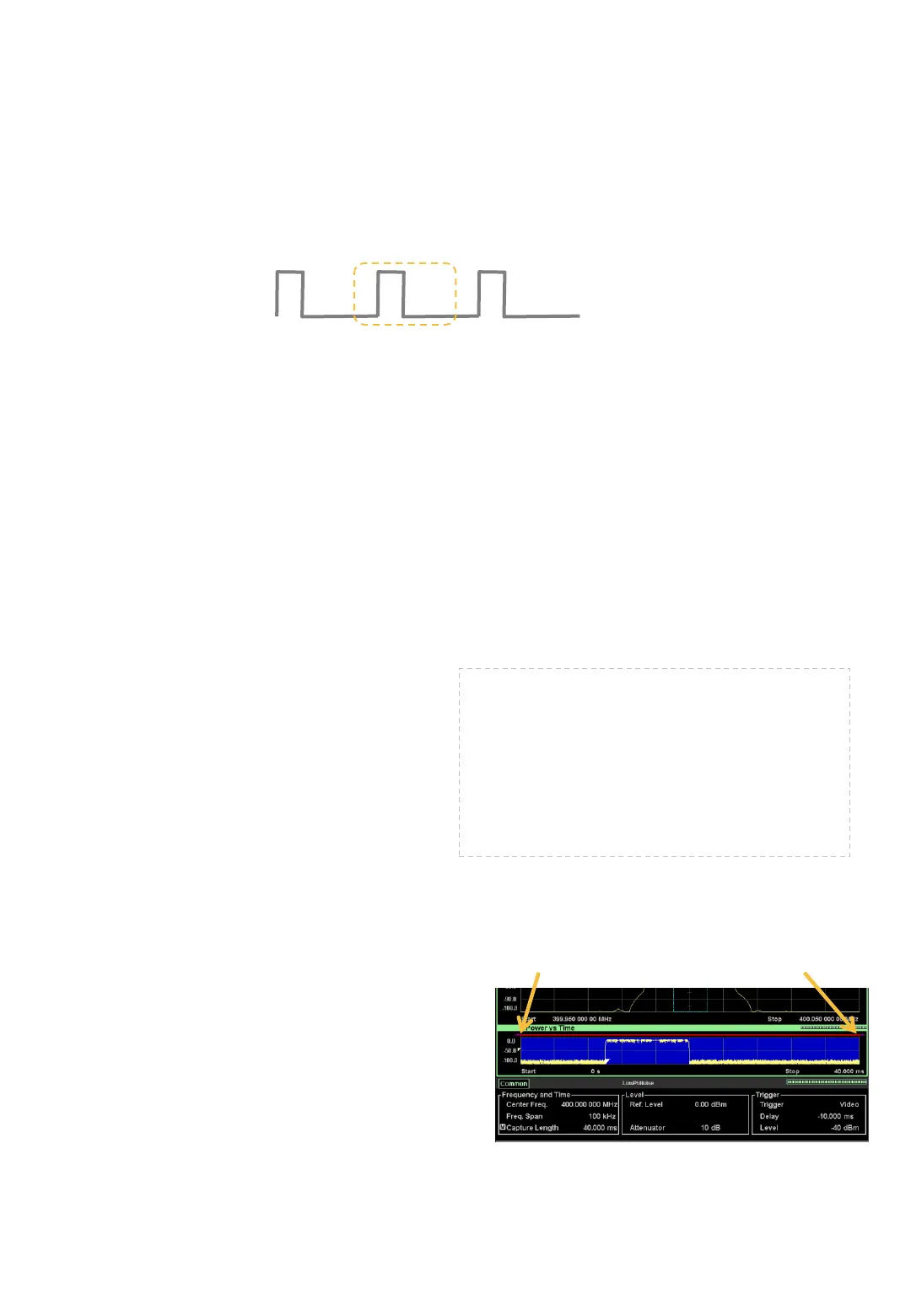
At signal capture, if the capture start time is set to
the burst signal On period, the recorded IQ data
becomes discontinuous. (Refer to page 10.)
In this example, the period of one burst is 40 ms.
Since the capture start time and end time are each
set to the burst signal Off period, set –10 ms at
Trigger Delay.
*A positive value such as 30 ms can also be set, but
the opposite value of –10 ms is set here.
Capturing One Burst Only
Trigger Delay Confirmation Screen
Capture start time Capture end time












 To Next Page