Confirming Signal 2/2
Checking Power vs Time: Burst Period
Use the signal analyzer to check the burst period of the target signal.
(Continued)
Setting main trace screen *Power vs Time settings at screen top
> [Trace]
> [F1: Trace Mode]
> [F2: Power vs Time]
Setting single sweep (Single)
> []
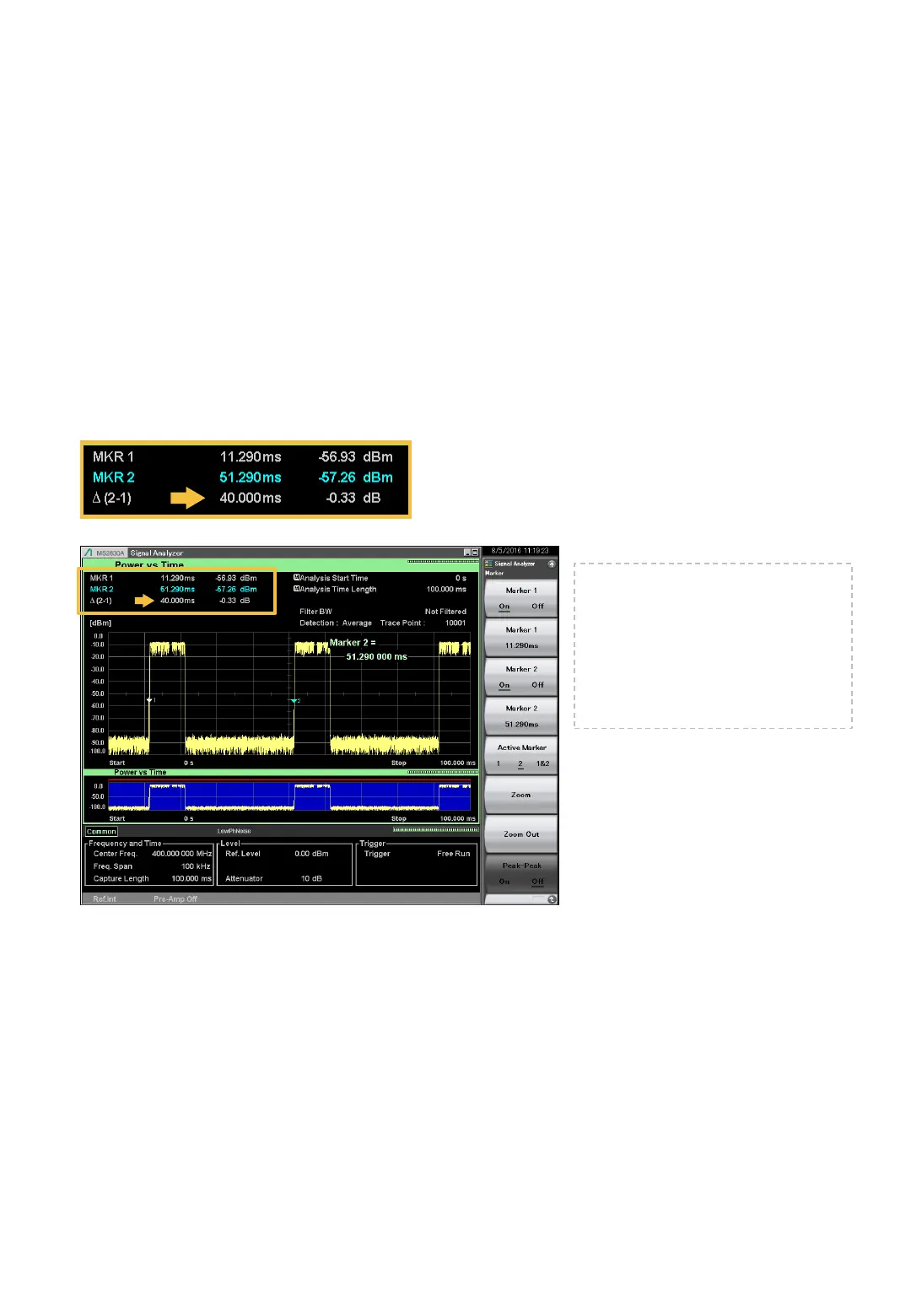
Checking burst signal period with markers
> [Marker]
> [F2: Marker1] = Shifts marker to first burst signal rise *Fine-adjust using Left/Right keys and rotary knob
> [F4: Marker2] = Shifts marker to second burst signal rise *Fine-adjust using Left/Right keys and rotary knob
> Check “⊿(2-1)” at screen top
Example of Power vs Time confirmation Screen
This sample signal has a period of
40 ms per burst that can be also
checked with a signal analyzer.
When the burst signal period is
very short (fast), check the time for
a longer period of 10 bursts if
there is a risk of error when
checking just one burst period.












 To Next Page