19
Recycle discarded product
in accordance with local
regulations.
TECHNICAL DATA
Rated voltage 400 V
~
50 Hz
Max output 9000 W
Power settings 52/4500/9000 W
Fuse 16 A
Ambient temperature -15 – +25°C
Protection rating IPX4
Max air volume 1198 m³/h
Air speed 4.4 m/s
DESCRIPTION
1. Mode selector
2. Thermostat dial
3. Fan mode
4. Low output mode + fan
5. High output mode + fan
6. Reset - to reset the overheating protection
FIG. 1
USE
INTENDED USE
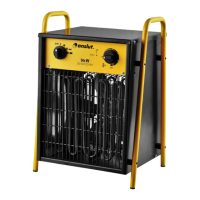
The fan is intended to be used for temporary
heating of storerooms, buildings, workshops,
garages, barns and other similar dry places.
HOW TO USE
WARNING!
Do not cover the fan.
1. Stand the fan upright on a at surface at a
safe distance from ammable objects.
2. Connect the fan to a power point.
3. Set the thermostat in the MAX position
and turn the knob to full power. When
the required room temperature has been
reached, turn the thermostat knob anti-
clockwise until the thermostat switches o.
4. The thermostat will now turn the heat on/
o automatically to regulate the room
temperature to the set value.
NOTE:
When the heater fan is used for the rst time,
it may emit some smoke. This is normal and
stops after a while. The smoke comes from
the thin coat of protective oil which is applied
to the heater element during manufacture.
5. To switch o the product turn the
temperature dial to minimum and the
power dial to fan mode/low power, and
allow the fan to cool the product for 2
minutes before switching o the product
and pulling out the plug.
OVERHEATING PROTECTION
The overheating protection switches o the
fan if it overheats. If this happens, pull out the
plug from the power point and allow the fan to
cool. The overheating protection must be reset
manually.
NOTE:
The overheating protection trips at a
temperature of 85°C.
MAINTENANCE
IMPORTANT:
Make sure the plug is pulled out from the
power point before cleaning and/or putting
away.
• Disconnect the fan from the power point
and allow it to cool before cleaning.
• Wipe the outside with a soft cloth
dampened with a mild soap solution.
Make sure not to get any water in the fan.
Wipe with a dry cloth.
NOTE:


 To Next Page