EN
110
5. While the heat pump is running, check that the inlet water
temperature is the same as what is shown on the control
panel.
SWITCHING ON/OFF
NOTE:
When the heat pump starts, it starts in standby mode.
1. Press
to start the heat pump. The heat pump starts in the
mode it was in when it was switched o.
2. Press
again to switch o the heat pump.
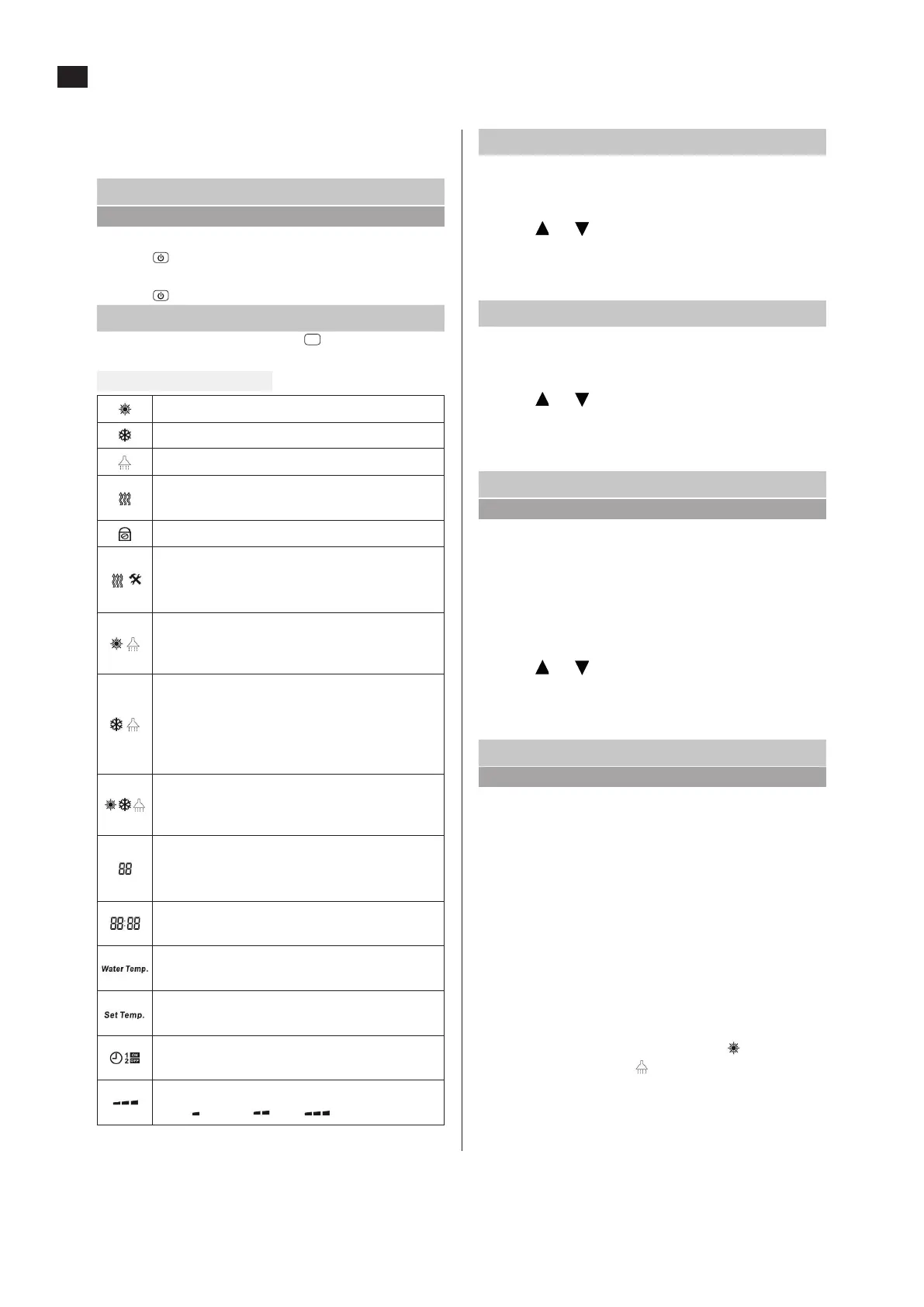
SELECTING THE OPERATING MODE
1. When the heat pump starts, press
O
on the control panel to
scroll to the required operating mode
FIG. 33
Heating mode (constant temp.)
Cooling mode (constant temp.)
Hot tap water mode
Additional heating mode
- Goes out when the set temperature is reached
Holiday mode
Hygiene mode (Legionella protection)
Not applicable on this model.
Additional heating (1.5 kW) via manual thermostat.
Heating + hot tap water mode
- Switches to heating mode when the set
temperature is reached
Cooling + hot tap water mode
- Switches to cooling mode when the set
temperature is reached (not in operation)
NOTE! This mode is available only if the heat pump is
connected with a motorised 3-way valve
Hot tap water + auto mode
- Switches to auto mode when the set temperature is
reached (not in operation)
Temperature, time or error code
- Display range air temperature: 0–75 °C
- Display range water temperature: 0–99 °C
Time
- Time continues in the event of a power failure.
Water temperature
Shown only for control by water temperature
Set point temperature
- Flashes when the temperature is set.
Timer function
- Shown when the timer is activated
Compressor speed
- Low
Medium High
HEATING MODE
• Current water temperature is shown under WATER TEMP.
• The setting range for heating mode is 30–50 °C.
1. In heating mode, press SET. SET TEMP ashes.
2. Press
and
to set the temperature.
3. Press SET again to save and exit setting mode.
– If no settings are made in 5 seconds the setting is
automatically saved and the setting mode is closed.
COOLING MODE
• Current water temperature is shown under WATER TEMP.
• The setting range for cooling mode is 7–25 °C.
1. In cooling mode, press SET. SET TEMP ashes.
2. Press
and to set the temperature.
3. Press SET again to save and exit setting mode.
– If no settings are made in 5 seconds the setting is
automatically saved and the setting mode is closed.
HOT TAP WATER MODE
NOTE:
Temperature setting via the control panel, max 52 °C
(recommended 50 °C). Additional heating up to 75 °C for hot
tap water using the electric heater 1.5 kW, is set manually via
the dial on the front panel.
• Current water temperature is shown under WATER TEMP.
• The setting range for hot tap water mode is 52 °C.
1. In hot tap water mode, press SET. SET TEMP ashes.
2. Press
and
to set the temperature.
3. Press SET again to save and exit setting mode.
– If no settings are made in 5 seconds the setting is
automatically saved and the setting mode is closed.
HEATING + HOT TAP WATER MODE
NOTE:
• The heat pump has an integrated 3-way valve that
switches between hot water, heating and cooling.
• Connect a separate 3-way valve to separate the cooling
and heating systems. Without a distribution system for
cooling (fan convector heaters with insulated connection
pipe) condensation occurs on the pipes and radiators/
underoor heating.
• When the heat pump works in heating mode, the control
panel also detects the hot tap water temperature. When the
water temperature drops more than 5 °C below the set point
value, the heat pump starts in hot tap water mode, works
until the set point temperature is reached and then switches
to heating mode. The heat pump stops working when the
set point temperature is reached in both modes.
• When the heat pump is in heating mode,
ashes, when it
is in hot tap water mode
ashes.
• Current water temperature is shown under WATER TEMP.
• The current water temperature and the set point
temperature for the current mode are shown on the wired
control panel.


 To Next Page
 Loading...