Need help?
Do you have a question about the Antari HZ-500 and is the answer not in the manual?
Safety guidelines for handling electrical hazards, including keeping the device dry and using grounded outlets.
Proper grounding procedures to prevent electric shock and ensure safe electrical connections.
Guidelines for using the correct plugs and extension cords for safe operation.
Precautions regarding modifications, adult use, unattended operation, and ventilation.
Verifying arrival and checking for transit damage before initial setup.
Step-by-step guide to safely add haze liquid to the tank, including refill suggestions.
Emphasizing the use of dealer-recommended liquids for safety and warranty.
Key precautions during operation, including liquid level monitoring and filter maintenance.
Steps to take if the machine experiences low output or other malfunctions.
Description of the LCD panel, control buttons, and automatic parameter storage.
How to activate and stop continuous haze output using the VOLUME button.
How to activate immediate haze output by pressing the MANUAL button.
How to set up automatic haze output with time intervals and duration.
Adjusting the delay between haze outputs in timer mode using FUNCTION and UP/DOWN buttons.
Adjusting the length of each haze output in timer mode using FUNCTION and UP/DOWN buttons.
Configuring the DMX address for external control via the LCD panel.
Enabling or disabling the safety sensor for the haze outlet door.
Activating immediate, continuous haze output without timers.
Explanation for 'Out Of Order' display and checks for ventilation issues.
Instructions for securing the nozzle with a stopper before moving the machine.
Diagram and explanation of DMX connector pin assignments for 3-pin and 5-pin XLR.
How to control the unit's on/off function via DMX channel with a value range.
Information about Antari HZL-1 haze liquid for the HZ-500, its properties.
Caution against mixing different types of haze liquids and draining the tank.
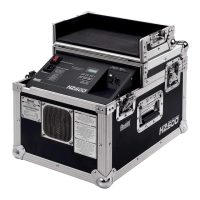
Details on the unit model (HZ-500) and its power supply requirements.
Information on output volume, tank capacity, and fluid consumption.
Details on unit weight and dimensions (LxWxH).
 General
| Product color | Black |
|---|---|
| Operating fluid | Oil |
| Smoke direction | Vertical direction |
| DMX connector type | XLR5 |
| Smoke machine type | Haze machine |
| Smoke output volume | - m³/min |
| Liquid tank capacity | 2.5 L |
| DMX channels quantity | 1 channels |
| Liquid level indicator | Yes |
| Light effects | No |
| AC input voltage | 220-240 V |
| AC input frequency | 50/60 Hz |
 Weight and Dimensions
| Depth | 490 mm |
|---|---|
| Width | 351 mm |
| Height | 338 mm |
| Weight | 31500 g |

 To Next Page